Embarking on the journey of 3D printing often leads to encountering the occasional, yet frustrating, nozzle clog. Understanding how to effectively clean your 3D printer nozzle is not just a matter of convenience; it’s fundamental to maintaining the quality and consistency of your prints. This comprehensive guide will equip you with the knowledge and techniques to tackle these common issues, ensuring your printing projects run smoothly.
We will explore the underlying causes of nozzle blockages, identify the tell-tale signs that indicate a problem, and detail the potential damage that can arise from neglecting these issues. Furthermore, we will delve into the essential tools and materials required for effective nozzle maintenance, providing a clear path to restoring your printer’s optimal performance.
Understanding Nozzle Clogs
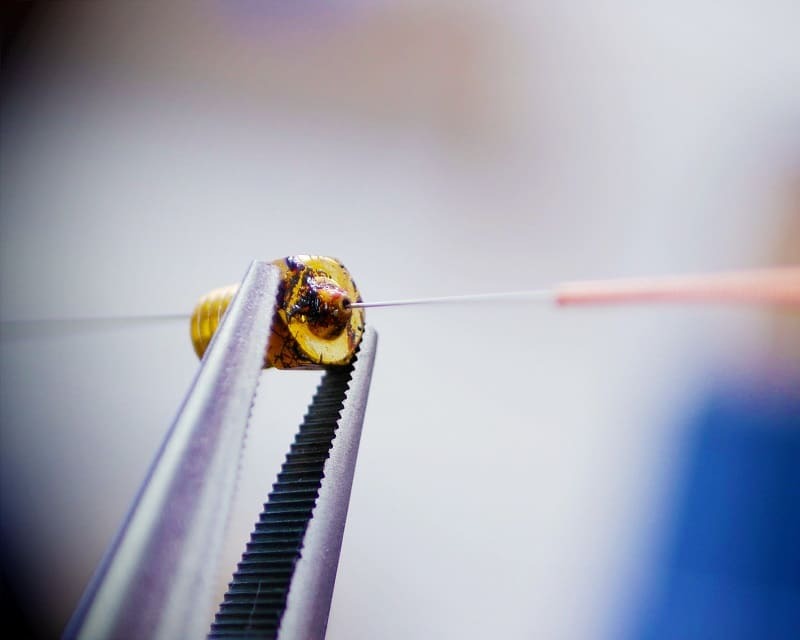
A clogged 3D printer nozzle is a common and often frustrating issue that can halt your printing progress. These blockages prevent filament from extruding correctly, leading to poor print quality or complete print failures. Understanding the causes and recognizing the signs of a clog is the first step toward resolving the problem and ensuring smooth operation of your 3D printer.Nozzle clogs occur when foreign materials or partially melted filament obstruct the narrow opening of the nozzle.
This obstruction can be caused by a variety of factors, ranging from material issues to operational errors. Addressing these issues promptly can save you time, filament, and potential damage to your printer components.
Common Causes of 3D Printer Nozzle Clogs
Several factors can contribute to the formation of a nozzle clog. Identifying the root cause is crucial for effective prevention and resolution. These causes often stem from the filament itself, the printing environment, or the printer’s settings.
- Filament Debris: Small particles of dust, dirt, or plastic shavings can be present in filament spools. If these particles are drawn into the hotend, they can accumulate and form a blockage.
- Filament Quality: Low-quality filament, especially that with inconsistent diameter or impurities, is more prone to causing clogs. Variations in filament diameter can lead to uneven melting and jamming.
- Printing Temperature Issues: Printing at a temperature too low for the filament can cause it to not melt sufficiently, leading to partial solidification within the nozzle. Conversely, printing at excessively high temperatures can cause some filaments to degrade and become sticky, adhering to the nozzle walls.
- Heat Creep: This occurs when heat travels too far up the filament path, causing the filament to soften and become sticky before it reaches the nozzle. This is often due to inadequate cooling of the heatsink in the hotend.
- Poor Filament Loading: If filament is not loaded correctly, or if there are tangles in the spool, it can cause stress on the extruder gears and lead to filament grinding, producing fine plastic dust that can clog the nozzle.
- Residue from Previous Prints: Small pieces of filament or burnt material from previous prints can remain in the nozzle and contribute to future clogs.
Signs of a Clogged Nozzle
Recognizing the symptoms of a clogged nozzle is essential for addressing the issue before it severely impacts your print. Early detection allows for simpler and less invasive clearing methods.
- Under-extrusion: The most common sign is a reduction in the amount of filament being extruded. This can manifest as thin, weak layers, gaps between lines, or a complete absence of filament.
- Inconsistent Extrusion: The filament might extrude intermittently, with periods of good flow followed by sputtering or no flow at all.
- Stringing and Oozing: While not exclusively a sign of a clog, severe stringing and oozing can sometimes be related to partial blockages causing uneven pressure release.
- No Filament Extrusion: If no filament comes out of the nozzle despite the extruder motor turning, it is a strong indication of a complete clog.
- Clicking or Grinding Extruder: The extruder motor might make clicking or grinding noises as it struggles to push filament through a blocked nozzle.
- Poor Adhesion and Warping: Inconsistent extrusion can lead to poor first-layer adhesion and increased warping, as the plastic is not being laid down uniformly.
Potential Damage from Severely Clogged Nozzles
A persistently clogged nozzle, if not addressed, can lead to more significant problems beyond just failed prints. The continued strain on the printer’s components can cause damage that is more costly and time-consuming to repair.
- Damage to the Extruder: The extruder motor can be overworked and overheat, potentially damaging its gears or the motor itself due to the excessive force required to push filament through a blockage.
- Damage to the Hotend: Continued attempts to extrude through a clog can lead to excessive heat buildup in the hotend assembly. This can degrade the PTFE tube (if present), melt or deform the heater block, or damage the thermistor and heater cartridge.
- Damage to the Bowden Tube (if applicable): In Bowden setups, a severe clog can cause filament to back up into the Bowden tube, potentially melting or deforming the tube, leading to leaks and further extrusion issues.
- Wear on the Nozzle: Repeated attempts to clear a clog, especially with abrasive methods, can wear down the internal diameter of the nozzle, affecting future print quality.
- Reduced Print Quality Over Time: Even if a clog is partially cleared, residual debris can lead to inconsistent extrusion and a permanent reduction in print quality, requiring the nozzle to be replaced.
Essential Tools and Materials
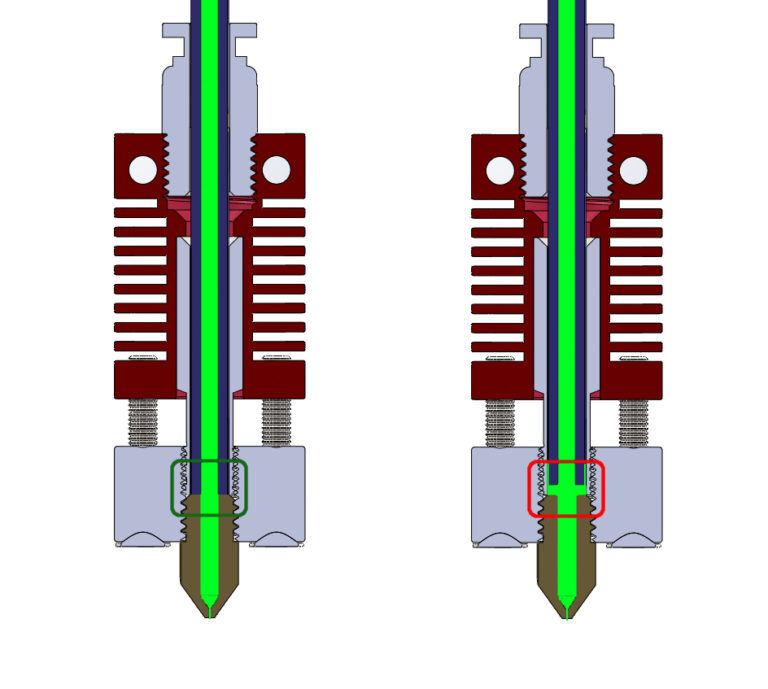
Successfully clearing a 3D printer nozzle requires a specific set of tools and materials. Having these readily available will ensure a smooth and efficient cleaning process, minimizing downtime and potential damage to your printer. This section Artikels everything you’ll need, explaining the role of each item in restoring your nozzle to optimal performance.Preparing your workspace is equally crucial for a safe and effective nozzle cleaning.
A clean, well-lit, and organized area will prevent accidental drops of small parts, contamination of the nozzle, and ensure you can easily locate all your tools. Consider covering your work surface with a disposable mat or newspaper to catch any debris or cleaning solutions. Ensure good ventilation, especially if using chemical cleaning agents, and have a designated spot for both clean and dirty parts.
Tools for Nozzle Cleaning
A variety of specialized tools are instrumental in effectively cleaning a 3D printer nozzle, addressing different types of clogs and residues. The careful selection and use of these items will determine the success of the cleaning operation.
- Needle Files or Dental Picks: These fine-tipped tools are perfect for physically dislodging hardened filament particles from the nozzle’s opening and internal passages. Their precision allows for targeted cleaning without damaging the nozzle’s delicate structure.
- Nozzle Cleaning Needles/Drills: Specifically designed for this purpose, these needles or small drill bits match the internal diameter of common nozzle sizes. They are inserted into the nozzle to break up and remove stubborn clogs.
- Tweezers: Essential for handling small parts, such as filament fragments or cleaning needles, with precision. They also help in removing any loose debris from the nozzle exterior.
- Heat Gun or Lighter: Used to gently heat the nozzle, softening hardened filament to make it easier to remove with other tools. Extreme caution must be exercised to avoid overheating and damaging the nozzle or surrounding components.
- Small Pliers (e.g., Needle-Nose Pliers): Useful for gripping and pulling out softened filament or for holding the nozzle securely while working on it, especially when it’s hot.
- Soft Brush (e.g., Toothbrush or Brass Brush): For gently scrubbing away any external residue or melted filament from the nozzle body and heater block. A brass brush is more effective for tougher residues but requires a gentler touch.
Materials for Nozzle Cleaning
Beyond the tools, certain consumable materials play a vital role in dissolving residues and ensuring a thorough clean. These materials, when used correctly, can effectively tackle even the most persistent clogs.
- Acetone (for PLA/ABS clogs): A powerful solvent that can dissolve many common 3D printing filaments, particularly ABS. It is crucial to use acetone in a well-ventilated area and handle it with care, as it is flammable.
- Denatured Alcohol (for some PLA/PETG clogs): A less aggressive solvent than acetone, denatured alcohol can be effective for softening certain types of filament residue. It is also flammable and requires good ventilation.
- Cotton Swabs and Paper Towels: Used for applying cleaning solutions, wiping away dissolved filament, and drying the nozzle.
- Heat-Resistant Gloves: To protect your hands from burns when handling a hot nozzle or working with heated components.
- Safety Glasses: To protect your eyes from any flying debris or splashes of cleaning solutions.
Workspace Preparation
A well-prepared workspace is foundational for safe and effective 3D printer nozzle maintenance. This involves creating an environment that is conducive to detailed work, minimizes risks, and prevents contamination.The process begins with selecting an appropriate location. Ideally, this should be a well-lit area with ample space to lay out your tools and printer components. A sturdy workbench or table is recommended to prevent accidental movement during the cleaning process.
Furthermore, ensure there is good ventilation, especially if you plan to use chemical solvents like acetone or denatured alcohol. This will help dissipate any fumes and maintain a safe working atmosphere.Next, protect your work surface. Covering the area with a disposable mat, old newspaper, or a silicone mat will catch any dropped filament, cleaning solutions, or small parts. This not only keeps your workspace clean but also prevents these materials from being lost or causing damage to the underlying surface.Organize your tools and materials.
Before you begin, arrange all the necessary items within easy reach. This includes your cleaning tools, solvents, cotton swabs, and any replacement parts you might need. Having everything organized reduces the chances of fumbling for an item mid-process, which can lead to mistakes or dropped components.Finally, consider safety precautions. Always have heat-resistant gloves and safety glasses readily available, especially when dealing with a hot nozzle or potentially hazardous cleaning agents.
A small fire extinguisher can also be a prudent addition to your workspace, particularly when working with flammable solvents. By taking these preparatory steps, you create an optimal environment for successful nozzle cleaning and maintenance.
Cold Pull Method for Nozzle Cleaning
The cold pull method is a highly effective technique for removing stubborn clogs and debris from your 3D printer nozzle. It leverages the principle of thermal expansion and contraction to dislodge foreign materials that might be fused to the nozzle’s inner walls. This method is particularly useful when simple filament extrusion or needle cleaning proves insufficient.This process involves heating the nozzle to a specific temperature, then allowing it to cool significantly before forcefully pulling the filament out.
The semi-solid filament acts like a cleaning rod, grabbing onto and extracting molten plastic, dust, or other contaminants.
Steps Involved in Performing a Cold Pull
Executing a cold pull requires careful attention to temperature and force. The following steps Artikel the process for a successful cold pull:
- Heat the nozzle to the printing temperature of the filament currently loaded in your printer. This ensures the filament is sufficiently softened.
- Once the nozzle reaches temperature, manually extrude a small amount of filament to confirm it flows freely. This helps to ensure the clog isn’t too severe for the initial heating.
- Turn off the printer’s heaters. Allow the nozzle to cool down considerably. The ideal temperature is typically around 90-100°C for PLA, but this can vary depending on the filament type. The goal is for the filament to be solid enough to grip but still pliable enough to deform and pull contaminants.
- Once the nozzle has cooled to the target temperature, firmly grip the filament protruding from the extruder and pull it out with a steady, strong force. You should feel resistance, and upon successful removal, the end of the filament should show a clear imprint of the inside of the nozzle, often with embedded debris.
- Inspect the removed filament. Look for discoloration, burnt particles, or other foreign matter. If the filament is clean, the nozzle is likely clear. If debris is still present, repeat the process.
Filament Types Best Suited for the Cold Pull Technique
While many filaments can be used for cold pulls, certain types offer better results due to their melting and cooling characteristics. The key is to use a filament that becomes semi-rigid at the target cooling temperature, allowing it to adhere to contaminants without breaking.
- Nylon: Nylon is an excellent choice for cold pulls. It has a high melting point and cools into a strong, semi-rigid form that effectively grabs and pulls out debris. It’s also known for its strength, reducing the likelihood of the filament breaking inside the nozzle.
- PETG: PETG can also be effective, though it might require slightly different cooling temperatures compared to Nylon. It’s a good balance between rigidity and flexibility when cooled.
- PLA (with caution): While PLA can be used, it’s more prone to breaking during the pull if not cooled to the correct temperature. If using PLA, ensure it’s cooled sufficiently to be firm but not brittle. It’s often recommended to use PLA for a cold pull only if Nylon or PETG is not available, or for lighter clogs.
It is generally advisable to avoid using flexible filaments like TPU or TPE for cold pulls, as their inherent flexibility can make them difficult to grip and pull with the necessary force without stretching or breaking.
Frequency of Performing a Cold Pull
The frequency with which you should perform a cold pull depends on several factors, including the quality of your filament, your printing environment, and the types of materials you typically print with. Proactive cleaning can prevent more severe clogs down the line.
- Preventative Maintenance: For users who print frequently or use filaments known to leave residue (like some specialty filaments), performing a cold pull every 50-100 printing hours can be beneficial. This helps maintain optimal print quality and nozzle longevity.
- When Print Quality Declines: The most common indicator for a cold pull is a noticeable decrease in print quality. This can manifest as under-extrusion, stringing, inconsistent layer adhesion, or gaps in prints. If you observe these issues, a cold pull is often the first troubleshooting step.
- After Printing with Abrasive Filaments: Filaments containing abrasive additives, such as carbon fiber, wood, or metal particles, can wear down your nozzle and leave behind fine debris. It is highly recommended to perform a cold pull after printing a significant amount of these materials, or if you suspect nozzle wear.
- Before Switching Filament Types: Especially when switching between vastly different filament types (e.g., from PETG to PLA), a cold pull can help ensure no residue from the previous filament contaminates the new print.
Regularly inspecting your nozzle and performing cold pulls as needed will contribute to a smoother and more reliable 3D printing experience.
Hot Cleaning Techniques
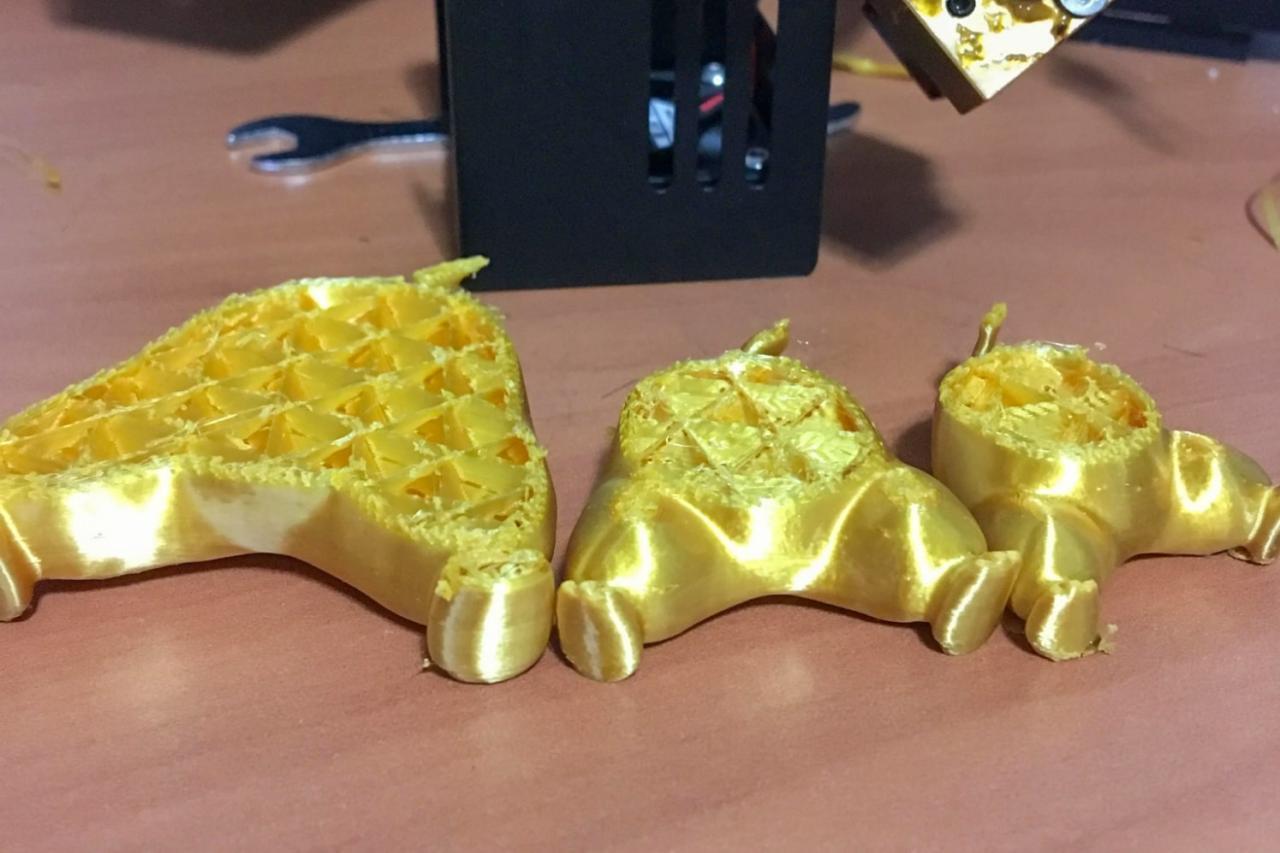
While cold cleaning methods are excellent for initial clog removal, sometimes residual filament or stubborn blockages require a more direct approach. Hot cleaning techniques involve addressing the nozzle while it’s heated to its printing temperature, allowing for more effective dislodging of molten or semi-molten debris. This method is particularly useful for filament that has partially melted and adhered to the nozzle’s internal surfaces.When dealing with persistent clogs, carefully applying heat can soften the obstructing material, making it easier to remove.
It’s crucial to maintain a safe working environment and use appropriate tools to avoid injury or damage to your printer. The following methods utilize heat to melt and extract blockages.
Clearing Blockages with Acupuncture Needles or Cleaning Drills
Acupuncture needles and specialized nozzle cleaning drills are fine-pointed tools designed to penetrate and break up blockages within the nozzle. These tools are used while the nozzle is heated, allowing them to push through softened filament. It’s important to select a needle or drill bit that is slightly smaller than the nozzle’s orifice to avoid damaging the delicate internal threading or the nozzle itself.The process typically involves heating the nozzle to the printing temperature of the filament that caused the clog.
Once heated, the acupuncture needle or drill bit is carefully inserted into the nozzle’s tip. Gentle, steady pressure should be applied to push the tool through the obstruction. Rotate the tool slightly if resistance is met, being careful not to force it. After the tool has passed through, extrude a small amount of filament to clear any loosened debris.
Always ensure the nozzle is at the correct temperature for the filament you are trying to clear. Too low a temperature will not soften the filament, and too high a temperature could potentially damage the nozzle or surrounding components.
Comparison of Hot Cleaning Methods
Several hot cleaning methods exist, each with its own advantages and suitability for different types of clogs. The choice of method often depends on the severity and nature of the blockage.Here’s a comparison of common hot cleaning techniques:
- Acupuncture Needle/Cleaning Drill Method: This is a direct and effective method for clearing physical obstructions. It’s best suited for partial clogs where a physical tool can dislodge the filament. Its effectiveness lies in its ability to mechanically break up hardened filament. However, it can be difficult to reach very deep clogs or those that have fused to the nozzle walls.
- Heat and Push Method: This involves heating the nozzle and then manually pushing filament through it. It’s a simpler approach that relies on the heat to melt the obstruction, allowing it to be extruded. This method is effective for minor clogs where the filament is still relatively soft. It is less effective for hardened or deeply embedded clogs.
- Chemical Cleaning (Less Common for Hot Cleaning): While not strictly a “hot” cleaning method in the sense of applying external heat, some users employ solvents to dissolve filament. However, this is generally done after the nozzle has cooled and is not recommended as a primary hot cleaning technique due to potential safety hazards and material compatibility issues.
The acupuncture needle or cleaning drill method offers the most precise control for physically breaking apart blockages. The heat and push method is a good first step for less severe clogs. Understanding the nature of the clog will help you select the most appropriate and effective hot cleaning technique.
Using Cleaning Filament
Cleaning filament offers a convenient and effective method for maintaining your 3D printer nozzle, especially for routine upkeep or after printing with challenging materials. This specialized filament is designed to bond with and remove residual plastic, debris, and colorants from the inside of your nozzle. It acts as a solvent and a physical cleaner in one, making it a valuable addition to your 3D printer maintenance toolkit.The primary benefit of using cleaning filament over manual methods like cold pulls or hot needle cleaning lies in its simplicity and consistency.
It requires minimal disassembly of your printer and can often be performed with just a few clicks through your printer’s interface. This automated process reduces the risk of damaging delicate nozzle components or your hotend, while ensuring a thorough and even clean. Furthermore, cleaning filament is particularly effective at removing color contamination when switching between highly pigmented filaments.
Benefits of Cleaning Filament
Cleaning filament provides several advantages for nozzle maintenance:
- Ease of Use: It’s a straightforward process that doesn’t require extensive technical knowledge or disassembly of the hotend.
- Time-Saving: Performing a cleaning filament run is typically much quicker than manual cleaning methods.
- Reduced Risk of Damage: By minimizing physical interaction with the nozzle, it lowers the chance of bending or breaking the nozzle or other hotend parts.
- Effective Color Changing: It excels at purging residual pigment when switching from dark or vibrant filament colors to lighter ones, preventing color bleeding in subsequent prints.
- Preventative Maintenance: Regular use can help prevent minor clogs from becoming major issues, keeping your printer running smoothly.
How to Use Cleaning Filament
The process of using cleaning filament is designed to be user-friendly. It generally involves loading the cleaning filament into your printer and extruding it at specific temperatures and speeds.
- Load the Cleaning Filament: Just like regular filament, load the cleaning filament into your extruder.
- Heat the Nozzle: Heat your nozzle to the recommended temperature for the cleaning filament. This is often slightly higher than the printing temperature of the filament you were previously using, but always refer to the manufacturer’s instructions.
- Extrude the Filament: Initiate an extrusion command through your printer’s interface. You will typically extrude a significant amount of filament, often 50-100mm or more, depending on the filament and your nozzle size. Observe the extruded filament; it should initially be the color of the previous filament, then transition to the color of the cleaning filament, and finally come out clear or with fewer impurities.
- Retract and Remove: Once you’ve extruded enough filament, retract it completely. You may need to repeat this process a few times for thorough cleaning.
- Load Your Regular Filament: After cleaning, remove the cleaning filament and load your desired printing filament. Extrude a small amount to ensure it prints cleanly and without any residual cleaning filament or contaminants.
Ideal Print Settings for Cleaning Filament
The effectiveness of cleaning filament is highly dependent on using the correct print settings. These settings are designed to allow the filament to flow freely and interact with the nozzle’s internal surfaces.
| Setting | Recommendation | Explanation |
|---|---|---|
| Nozzle Temperature | Manufacturer’s recommended temperature (often 10-20°C higher than the previous filament’s printing temperature) | Ensures the cleaning filament melts sufficiently to adhere to and dislodge debris. |
| Print Speed | Slow to moderate (e.g., 20-40 mm/s) | Allows ample time for the cleaning filament to interact with the nozzle walls. Avoid excessive speed, which can lead to under-extrusion and reduced cleaning effectiveness. |
| Retraction Settings | Standard retraction distance and speed | Standard retraction is usually sufficient for loading and unloading the filament without causing issues. |
| Layer Height | Not applicable (no printing to a build plate) | This setting is irrelevant as cleaning filament is extruded into the air. |
| Cooling Fan | Off or minimal | Prevents premature cooling of the filament as it exits the nozzle, allowing for better interaction with internal surfaces. |
It is crucial to always consult the specific instructions provided by the manufacturer of your cleaning filament, as optimal settings can vary slightly between brands.
Deep Cleaning and Disassembly
While the previous methods are effective for routine maintenance and minor clogs, sometimes a more thorough approach is necessary. Deep cleaning and disassembly allow for direct access to the nozzle’s internal pathways, ensuring even stubborn blockages are removed. This process requires careful attention to detail to avoid damaging the nozzle or its components.Disassembling your 3D printer nozzle is a critical step for deep cleaning.
It allows for direct access to the internal heating block and the nozzle itself, where filament residue can accumulate. This process should only be undertaken when simpler cleaning methods have proven insufficient. It is important to ensure your printer has cooled down completely before beginning disassembly to prevent burns.
Nozzle Disassembly Procedure
Before starting, gather your tools and ensure the printer is powered off and has cooled down. It is advisable to consult your specific printer’s manual, as the disassembly process can vary slightly between models.
- Heat the Nozzle: Preheat your 3D printer’s nozzle to a temperature slightly above the typical printing temperature of the filament you most commonly use. This will soften any hardened filament inside, making it easier to remove.
- Remove the Hotend Cover: If your hotend has a protective cover or shroud, carefully remove it. This usually involves unscrewing a few small screws.
- Unscrew the Heater Cartridge and Thermistor: The heater cartridge (which heats the nozzle) and the thermistor (which measures temperature) are typically held in place by set screws. Loosen these screws carefully, but do not remove them completely. Gently slide the heater cartridge and thermistor out of their respective holes in the heating block. Be very careful not to bend or break the wires connected to these components.
- Unscrew the Heat Break: The heat break connects the hotend to the nozzle. It is usually threaded into the heating block. Use an appropriate wrench or pliers to carefully unscrew the heat break from the heating block. You may need to hold the heating block steady with another tool to prevent it from rotating.
- Unscrew the Nozzle: Once the heat break is removed, the nozzle should be accessible. It is also threaded into the heating block. Use a wrench to carefully unscrew the nozzle. It might be tight, so apply steady pressure.
Methods for Thoroughly Cleaning a Disassembled Nozzle
With the nozzle components separated, you can now perform a more intensive cleaning. The goal is to remove any residual filament, carbonized particles, or other debris that might be obstructing the nozzle’s bore.
- Boiling Water or Hot Air Gun: For brass nozzles, soaking them in boiling water for several minutes can help soften and dislodge filament residue. Alternatively, a hot air gun can be used to heat the nozzle and melt away stubborn debris. Ensure adequate ventilation when using a hot air gun.
- Needle Cleaning: After softening the filament, use a fine acupuncture needle or a specialized nozzle cleaning needle to carefully poke through the nozzle’s bore from the inside out. Work gently to avoid enlarging the nozzle’s opening or damaging its internal threads.
- Solvent Soak (for specific filaments): If you primarily print with materials like PLA or PETG, a short soak in isopropyl alcohol (IPA) can help dissolve residual plastic. For ABS or other more resilient filaments, a stronger solvent might be required, but always research the compatibility of solvents with your nozzle material (e.g., brass can be affected by certain chemicals). Always rinse thoroughly after using any solvent.
- Wire Brush and Acetone: For external cleaning of the heating block and nozzle threads, a brass wire brush can be effective. For stubborn carbon buildup on the exterior, a brief soak in acetone (ensure good ventilation and wear gloves) can help break it down. Rinse thoroughly afterwards.
Importance of Correct Nozzle Reassembly
Reassembling the nozzle correctly is as crucial as the cleaning process itself. Improper reassembly can lead to leaks, poor print quality, and even further damage to your hotend.
When reassembling, ensure that all threaded connections are clean and free of debris before screwing them together. Tighten components firmly but avoid over-tightening, which can strip threads or damage parts. It is recommended to reassemble while the heating block is still warm (but not excessively hot) as this can help create a tighter seal between the nozzle and the heat break, preventing filament leaks.
Proper reassembly ensures a secure connection, preventing filament leaks and maintaining optimal heat transfer for consistent extrusion.
After reassembly, it is a good practice to perform a “cold pull” or a test print at a low temperature to verify that there are no leaks and that filament is extruding smoothly. This final check helps catch any issues before they impact your prints.
Preventing Future Nozzle Clogs
Maintaining a clean and well-functioning 3D printer nozzle is crucial for consistent print quality and longevity. While cleaning is essential, adopting proactive measures can significantly reduce the frequency of clogs, saving you time and frustration. This section Artikels best practices to keep your nozzle clear and your printing experience smooth.The key to preventing clogs lies in a combination of proper filament handling, optimized printer settings, and regular, albeit less intensive, maintenance.
By paying attention to these details, you can minimize the chances of encountering blockages during your printing projects.
Filament Storage Best Practices
Filament, especially hygroscopic materials like PLA and PETG, can absorb moisture from the air. This absorbed moisture can cause issues during printing, leading to popping sounds, poor layer adhesion, and ultimately, nozzle clogs. Proper storage ensures your filament remains in optimal condition.To safeguard your filament from environmental factors, consider the following storage methods:
- Airtight Containers: Store filament spools in resealable plastic bags or dedicated filament storage containers. These create a barrier against humidity.
- Desiccants: Include desiccant packets (like silica gel) within your storage containers. These packets absorb any residual moisture, further protecting your filament. Regularly “recharge” or replace desiccants as they become saturated.
- Controlled Environment: If possible, store your filament in a cool, dry environment. Avoid areas with high humidity, such as basements or garages, unless they are climate-controlled.
- Vacuum Sealing: For long-term storage or in very humid climates, vacuum-seal filament bags. This method offers the highest level of protection against moisture ingress.
Optimizing Printing Temperatures and Retraction Settings
The temperature at which you print and how your printer retracts filament can have a significant impact on nozzle health. Incorrect settings can lead to filament burning, stringing, or incomplete extrusion, all of which can contribute to clogs.It is essential to fine-tune your printer’s temperature and retraction settings to match the specific filament you are using.
- Printing Temperatures: Always refer to the filament manufacturer’s recommended printing temperature range. Printing too hot can cause filament to degrade and become sticky, while printing too cold can lead to under-extrusion and jams. Performing temperature towers for each new filament type is a good practice to find the optimal temperature.
- Retraction Settings: Retraction pulls filament back slightly into the nozzle during non-printing movements, preventing oozing and stringing. However, excessive retraction distance or speed can pull molten filament into the cooler parts of the hotend, where it can solidify and cause a clog. Experiment with retraction distance (typically 4-7mm for Bowden setups, 0.5-2mm for direct drive) and retraction speed (typically 25-60 mm/s) to find the sweet spot for your printer and filament.
“The correct printing temperature and optimized retraction settings are your first line of defense against nozzle clogs.”
Visualizing Nozzle Issues and Solutions
Understanding the physical state of your 3D printer’s nozzle is crucial for effective troubleshooting and maintenance. By visualizing common issues and their ideal resolutions, you can better diagnose problems and ensure optimal print quality. This section will provide descriptive textual representations to help you picture what a clogged nozzle looks like, the interior of a clean nozzle, and the filament’s journey through a pristine nozzle.By developing a mental model of these states, you can more accurately identify when your nozzle requires attention and what a successful cleaning looks like.
This visual understanding complements the practical cleaning methods discussed previously.
Clogged Nozzle Opening Representation
A clogged nozzle opening typically presents as a partially or fully obstructed aperture at the very tip of the nozzle. Imagine looking at the very end of the metal nozzle. Instead of a clear, circular hole, you might see:
- A dark, hardened mass of filament material partially or completely covering the exit hole.
- Small, irregular protrusions or strings of plastic sticking out from the opening, indicating an incomplete extrusion or a blockage that has started to form.
- A dull or discolored appearance around the opening due to burnt filament residue or accumulated debris.
- In severe cases, the opening may appear entirely sealed or distorted, preventing any filament from passing through.
This blockage impedes the smooth flow of molten plastic, leading to under-extrusion, stringing, and failed prints.
Clean Nozzle Interior Visualization
A clean nozzle interior is characterized by smooth, unobstructed pathways. When you imagine looking down the barrel of a thoroughly cleaned nozzle:
- The inner walls should appear smooth and free of any burnt filament, plastic residue, or foreign particles.
- The bore (the central channel through which filament passes) should be uniform in diameter from the entry point to the exit tip.
- There should be no signs of charring, discoloration, or indentations on the internal surfaces.
- The transition from the filament entry to the heating chamber and then to the nozzle tip should be a continuous, clear path.
This pristine condition ensures that filament can melt and flow evenly without encountering resistance or contamination.
Filament Path Through a Clean Nozzle
The journey of filament through a clean nozzle is a seamless and efficient process. Consider the path as follows:
- Filament Entry: The solid filament strand enters the nozzle from the extruder assembly.
- Heating Zone: As the filament travels through the heated portion of the nozzle, it gradually softens and melts.
- Melting and Flow: The molten plastic is then pushed forward by the extruder’s drive gear.
- Nozzle Tip Exit: The liquefied filament is extruded through the precisely sized opening at the nozzle tip in a controlled stream.
This entire process is unimpeded, allowing for consistent layer deposition and high-quality prints. A clean nozzle ensures that the filament’s intended path is clear, facilitating optimal melting and extrusion.
Troubleshooting Common Cleaning Problems
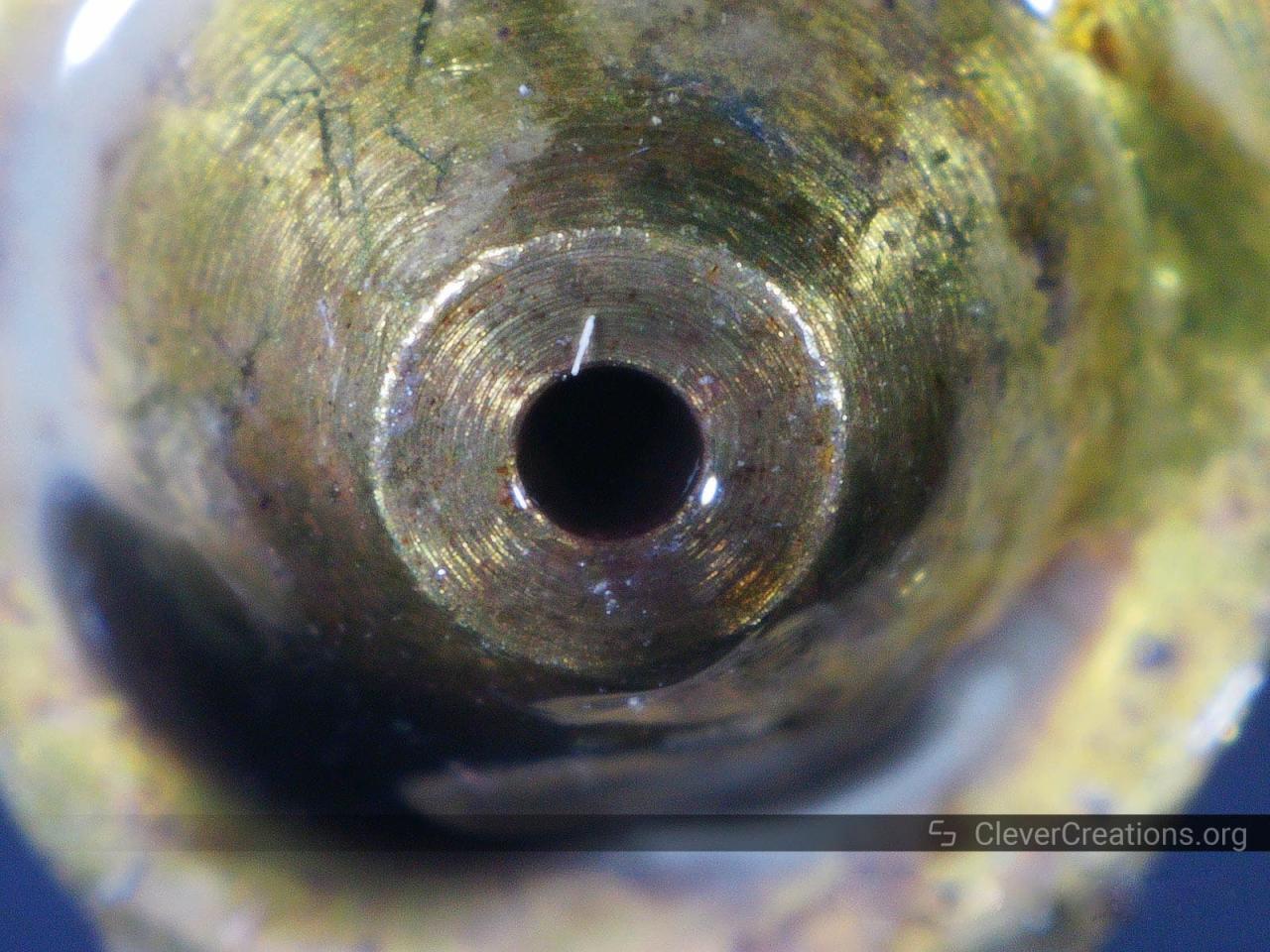
Even with the best techniques, you might encounter situations where your 3D printer nozzle proves particularly stubborn to clean. This section addresses those challenging clogs and potential issues that can arise during the cleaning process, ensuring you can overcome them effectively. It’s important to approach these problems methodically to avoid damaging your printer.When a nozzle clog resists standard cleaning methods, it often indicates a deeply embedded obstruction or material degradation.
Identifying the root cause is key to selecting the appropriate solution. Persistent issues might require more advanced techniques or a reassessment of the nozzle’s condition.
Stubborn Clog Solutions
For clogs that don’t yield to the cold pull or hot cleaning methods, a more intensive approach may be necessary. These solutions are designed for situations where the filament has fused or carbonized within the nozzle.
- Chemical Dissolving Agents: For certain filament types, specific solvents can help break down stubborn residue. For PLA, acetone can be effective, while ABS might benefit from a stronger solvent like dichloromethane (use with extreme caution and in a well-ventilated area). Always research the compatibility of solvents with your specific filament and nozzle material. Submerging the nozzle in the solvent for an extended period, followed by a gentle push with a cleaning needle or filament, can dislodge hardened material.
- Heat Treatment: In some cases, carefully applying more heat than usual can soften hardened plastic. This should be done cautiously, as excessive heat can damage the nozzle or surrounding components. Using a heat gun or a carefully controlled external heat source can help. After heating, attempt a cold pull or use a cleaning needle.
- Mechanical Dislodgement with Fine Tools: For very fine clogs, a thin acupuncture needle or a specialized nozzle cleaning drill bit can be used. Insert the needle carefully into the nozzle opening and gently probe to break up the obstruction. Ensure the nozzle is at a suitable temperature for this – warm enough to soften the plastic but not so hot that it’s difficult to handle or risks melting surrounding parts.
Issues Arising During Cleaning and Their Remedies
The cleaning process itself can sometimes introduce new problems or highlight existing ones. Being aware of these potential pitfalls and their solutions will save you time and frustration.
- Nozzle Damage from Force: Applying too much force with cleaning tools can bend or break the tip of the nozzle. If this occurs, the nozzle’s printing performance will be compromised, and replacement is usually necessary. Prevention is key: use appropriate force and tools.
- Stripped Threading: When attempting to remove a nozzle for deep cleaning, it’s possible to strip the threads on either the nozzle or the heater block if not done correctly. Always ensure the heater block is adequately heated and use the correct size wrench. Turning the nozzle too forcefully or at an angle can cause this. If threads are stripped, repair or replacement of the heater block might be required.
- Incomplete Cleaning: Sometimes, despite efforts, small fragments of filament remain lodged. This can lead to intermittent extrusion issues or stringing. Repeating the cleaning process, perhaps with a different method or a cleaning filament, is often the solution.
- Damage to Thermistor or Heater Cartridge: During disassembly for deep cleaning, it’s possible to accidentally dislodge or damage the thermistor or heater cartridge wires. Handle these delicate components with care, ensuring they are securely seated before reassembling.
When to Replace a Nozzle
While cleaning is often effective, there are times when replacing the nozzle is the more practical and cost-effective solution. Recognizing these signs prevents further damage and ensures optimal print quality.
- Visible Wear or Damage: If the nozzle tip is visibly deformed, chipped, or has a significantly enlarged opening, it’s time for a replacement. This wear can result from abrasive filaments or prolonged use.
- Persistent Clogs After Multiple Attempts: If you have tried various cleaning methods multiple times without success, the clog may be too severe or the nozzle may have internal damage that cleaning cannot rectify.
- Compromised Print Quality: If you consistently experience poor print quality, such as stringing, under-extrusion, or inconsistent layer adhesion, even after thorough cleaning and calibration, the nozzle might be the culprit. A worn or damaged nozzle can no longer produce precise extrusion.
- Nozzle Material Degradation: Over time, especially with high-temperature filaments or abrasive materials, the nozzle material can degrade, leading to inconsistent extrusion and poor print quality. Replacing the nozzle ensures you are working with a pristine printing surface.
Closing Notes
Mastering the art of 3D printer nozzle cleaning empowers you to overcome printing obstacles and achieve consistently impressive results. By understanding the causes, employing the right techniques, and practicing preventative care, you can significantly extend the life of your nozzle and elevate the quality of your 3D prints. This knowledge is your key to unlocking uninterrupted creativity and realizing your most ambitious design projects with confidence.