How to Achieve a Smooth Top Surface on Your Prints sets the stage for this enthralling narrative, offering readers a glimpse into a story that is rich in detail with a formal yet friendly language style and brimming with originality from the outset.
This comprehensive guide delves into the intricate science and practical techniques behind achieving a pristine, smooth top surface on your 3D prints. We will explore the fundamental principles governing extrusion and cooling, dissect common issues arising from fused deposition modeling (FDM), and highlight the crucial role of material properties. By understanding these core concepts, you’ll be well-equipped to elevate the aesthetic quality of your creations.
Understanding the Fundamentals of Smooth Print Surfaces
Achieving a consistently smooth top surface on your 3D prints is a common goal for many makers, directly impacting the aesthetic appeal and functional integrity of the final object. This smooth finish is not merely a matter of luck but a result of understanding and controlling several critical factors throughout the printing process. By delving into the underlying principles, we can systematically address the causes of imperfections and implement effective solutions.The quality of a 3D print’s top surface is fundamentally influenced by the interplay of material extrusion, layer adhesion, and the cooling process.
During fused deposition modeling (FDM), molten plastic is deposited layer by layer. The way this plastic is laid down, how it cools and solidifies, and how subsequent layers interact with it all contribute to the final surface texture.
Primary Factors Influencing Top Surface Finish
Several key elements dictate the smoothness of a 3D print’s top surface. These range from the printer’s mechanical setup to the specific settings used in the slicing software.
- Extrusion Control: The precise amount of filament extruded (flow rate or extrusion multiplier) is paramount. Over-extrusion can lead to excess plastic pooling and creating bumps, while under-extrusion results in gaps and a rough, uneven surface.
- Layer Height: The thickness of each printed layer significantly affects perceived smoothness. Smaller layer heights generally result in finer detail and a smoother overall finish, as the “stair-stepping” effect is reduced.
- Print Speed: The speed at which the print head moves, particularly during the top layers, influences how well the extruded filament can settle and cool. Slower speeds often allow for better control and adhesion.
- Cooling: Effective cooling is essential for the extruded plastic to solidify quickly and maintain its shape. Inadequate cooling can lead to sagging and deformation, especially on overhangs and top surfaces.
- Bed Leveling and First Layer Adhesion: While primarily affecting the bottom surface, a poorly leveled bed or weak first layer adhesion can propagate issues upwards, indirectly impacting the top surface quality.
Physical Processes During Extrusion and Cooling
The transformation of filament into a solid, smooth surface involves intricate physical processes that occur in rapid succession. Understanding these stages helps in diagnosing and resolving surface defects.During extrusion, heated filament is forced through a nozzle. The molten plastic flows and adheres to the layer below. Immediately after deposition, the plastic begins to cool and solidify. This cooling rate is influenced by ambient temperature, part cooling fan speed, and the thermal properties of the filament.
If cooling is too slow, the plastic may deform under its own weight or the weight of subsequent material, leading to sagging or blobbing. Conversely, if cooling is too rapid or uneven, it can cause internal stresses and warping. The process is a delicate balance of controlled melting, precise deposition, and efficient, uniform solidification.
Common Causes for Rough or Uneven Top Surfaces in FDM Prints
Roughness on the top surface of FDM prints is a frequent challenge. Identifying the specific cause is the first step toward rectification.The common culprits behind uneven top surfaces often stem from issues with filament deposition and solidification. These can manifest in various ways, from visible gaps to raised ridges.
- Inconsistent Extrusion: Fluctuations in filament flow, often due to a partially clogged nozzle, worn extruder gear, or inconsistent filament diameter, lead to uneven deposition.
- Poor Layer Adhesion: If layers are not bonding properly, the top surface can appear lumpy or separated. This can be caused by printing too fast, insufficient nozzle temperature, or inadequate cooling.
- Over-extrusion on Top Layers: When too much plastic is extruded on the final layers, it can create bumps and ridges as the excess material has nowhere to go.
- Under-extrusion on Top Layers: Insufficient plastic leaves gaps between extrusion lines, resulting in a porous and rough surface.
- Insufficient Cooling: If the part cooling fan is not effective enough, molten plastic can sag or droop before solidifying, especially on infill patterns or when bridging.
- Z-Seam Issues: While more commonly associated with vertical surfaces, the placement and appearance of the Z-seam can sometimes contribute to a less uniform top surface if not managed properly.
- Warping: Uneven cooling can cause the print to lift from the build plate, leading to uneven layers and a distorted top surface.
Role of Material Properties in Achieving a Smooth Top Layer
The choice of filament material plays a significant role in the achievable smoothness of a 3D print’s top surface. Different polymers exhibit distinct thermal and mechanical properties that influence their behavior during printing.Materials like ABS (Acrylonitrile Butadiene Styrene) tend to require higher nozzle temperatures and can be prone to warping due to their higher thermal expansion. This can make achieving a perfectly smooth top surface more challenging without careful control of the printing environment.
PLA (Polylactic Acid), on the other hand, generally prints at lower temperatures, cools more quickly, and is less prone to warping, often resulting in a naturally smoother top finish with fewer defects.Furthermore, the viscosity of the molten plastic is crucial. A material with a lower melt viscosity will flow more easily and consistently, potentially leading to better layer adhesion and a smoother surface.
Conversely, materials with high viscosity might struggle to flow into the desired shape, leading to inconsistencies. Additives within filaments, such as impact modifiers or lubricants, can also influence surface finish by altering flow characteristics or reducing friction. The hygroscopic nature of some filaments is also important; if a filament has absorbed moisture, it can lead to bubbling and inconsistent extrusion, negatively impacting surface quality.
Optimizing Printer Settings for a Flawless Top Layer

Achieving a perfectly smooth top surface on your 3D prints is a crucial step in producing professional-looking and aesthetically pleasing models. While understanding the fundamentals is essential, fine-tuning your printer’s settings plays an equally significant role in this process. This section will delve into the specific printer configurations that directly impact the quality of your top layers, providing actionable advice to elevate your print outcomes.The interplay of various printer settings creates the environment for the filament to deposit and solidify correctly.
By carefully adjusting parameters such as layer height, infill, print speed, temperatures, and cooling, you can significantly mitigate common top surface defects like gaps, ridges, and unevenness.
Layer Height for Top Surfaces
The layer height of your top surface directly influences how well each extruded line can fuse with the one below it, creating a cohesive and smooth finish.For optimal top surface smoothness, a smaller layer height is generally recommended. This allows for finer detail and better overlap between extruded lines, minimizing visible gaps or ridges.
- A layer height of 0.1mm to 0.2mm is often considered ideal for achieving smooth top surfaces with most FDM printers and filaments.
- When printing with a 0.4mm nozzle, a layer height of 0.2mm offers a good balance between speed and surface quality.
- For exceptionally smooth finishes, especially on models where the top surface is highly visible, reducing the layer height to 0.1mm or even 0.08mm can yield superior results, though this will increase print time.
- Ensure your printer’s firmware and slicer are calibrated to handle these smaller layer heights accurately.
Infill Density and Pattern Selection for Top Surface Support
The infill provides the structural foundation upon which your top layers are built. An appropriate infill density and pattern are critical for preventing sagging and ensuring a uniform surface.A well-chosen infill pattern and density will provide adequate support for the top layers without being overly wasteful of material or time.
- For most applications aiming for a smooth top surface, an infill density between 15% and 30% is typically sufficient.
- Certain infill patterns offer better support for the top layers than others. Patterns like ‘Grid’, ‘Gyroid’, or ‘Cubic’ are excellent choices as they provide a more uniform and supportive structure.
- ‘Lines’ or ‘Concentric’ infill patterns can sometimes lead to visible lines on the top surface if the infill is too sparse or the top layer extrusion width is too wide relative to the infill lines.
- Consider increasing infill density slightly if you are printing very thin-walled objects or if you observe sagging in the top layers, even with optimal settings.
Print Speed for the Top Layer
Print speed is a critical factor that affects how the molten plastic is laid down and how it cools. The top layer, being the last to be deposited, is particularly sensitive to speed.Slower print speeds allow the filament more time to adhere to the previous layer and to cool properly, resulting in a more uniform and defect-free surface.
- For the top layer, it is highly recommended to reduce the print speed significantly compared to the outer walls or infill.
- An optimal print speed range for the top layer is typically between 20mm/s and 40mm/s.
- Printing the top layer too fast can lead to under-extrusion, gaps between lines, and a rough surface finish as the filament doesn’t have enough time to settle.
- Conversely, printing too slowly might cause overheating and stringing, although this is less common for top layers than for outer walls. Experimentation within the recommended range is key to finding the sweet spot for your specific filament and printer.
Recommended Temperature Settings for Nozzle and Bed
Correct temperature settings are fundamental for proper filament adhesion and flow, which are paramount for a smooth top surface.Maintaining the right temperature ensures that the filament melts consistently and adheres well to the layer below, preventing warping and promoting a cohesive finish.
- Nozzle Temperature: Ensure your nozzle temperature is within the filament manufacturer’s recommended range. A slightly higher temperature within this range can sometimes promote better flow and adhesion for the top layer, leading to a smoother finish. However, excessive heat can cause oozing and stringing.
- Bed Temperature: The bed temperature is crucial for initial adhesion and preventing warping. For most PLA filaments, a bed temperature between 50°C and 60°C is suitable. For materials like ABS or PETG, higher bed temperatures (e.g., 90°C to 110°C for ABS, 70°C to 85°C for PETG) are necessary. Proper bed adhesion prevents the print from lifting, which can distort the top surface.
- Consider performing temperature towers for your specific filament to identify the optimal nozzle temperature that balances strength, surface finish, and printability.
Impact of Fan Speed on Top Surface Smoothness
The cooling fan plays a vital role in solidifying the extruded plastic. For top layers, managing cooling is a delicate balance to ensure proper adhesion while preventing premature cooling that can lead to poor layer fusion.Appropriate cooling helps the filament solidify quickly, preventing sagging and improving the definition of the extruded lines. However, insufficient cooling can lead to a messy and uneven surface.
| Fan Speed (%) | Impact on Top Surface Smoothness | Notes |
|---|---|---|
| 0-30% | Poor smoothness, potential sagging, rounded edges. | Insufficient cooling can cause layers to not solidify quickly enough, leading to deformation. Best for materials like ABS that require slower cooling. |
| 40-70% | Moderate smoothness, good balance for many materials. | This range often provides adequate cooling for PLA and PETG without causing excessive brittleness or adhesion issues. |
| 80-100% | Excellent smoothness, sharp definition, minimal sagging. | Ideal for PLA and other materials that benefit from rapid cooling. Ensures layers solidify quickly and maintain their shape, resulting in a crisp and smooth top surface. However, excessive cooling can sometimes lead to layer adhesion issues with certain filaments. |
When adjusting fan speed for top layers, consider the material you are using. PLA generally benefits from higher fan speeds, while ABS often requires significantly less cooling. It is also advisable to have a gradual ramp-up of fan speed during the print, rather than starting at 100% immediately, to avoid thermal shock and improve layer adhesion.
Filament Selection and Preparation for Superior Surfaces
The journey to achieving a flawless, smooth top surface on your 3D prints is significantly influenced by the very material you choose to extrude. Filament quality and proper preparation are not mere suggestions; they are fundamental pillars upon which surface finish excellence is built. Understanding these aspects will empower you to select the right materials and prepare them for optimal printing outcomes.Different filament types offer distinct inherent characteristics that directly impact the resulting surface finish.
Each material has its own melting point, viscosity, and cooling behavior, all of which play a crucial role in how the extruded plastic settles and solidifies. By understanding these differences, you can make informed choices based on your desired aesthetic and the capabilities of your printer.
Filament Type Surface Finish Capabilities
The inherent surface finish capabilities of common filament types vary considerably, making some more conducive to smooth top layers than others. This is primarily due to their chemical composition and printing requirements.
- PLA (Polylactic Acid): Generally considered the easiest filament to achieve a smooth surface with. It has a relatively low melting point and solidifies quickly, reducing the tendency for oozing and stringing which can mar surface finish. Its smooth, glossy finish is often achievable with standard settings.
- ABS (Acrylonitrile Butadiene Styrene): ABS can produce a very smooth and durable surface, but it requires more careful control. It has a higher printing temperature and a tendency to warp, often necessitating an enclosed printer and heated bed. When printed correctly, ABS can achieve a near-injection molded finish.
- PETG (Polyethylene Terephthalate Glycol): PETG strikes a balance between PLA and ABS. It is more durable and temperature-resistant than PLA but can be prone to stringing if not dialed in. Achieving a perfectly smooth top layer with PETG often requires fine-tuning retraction settings and printing speed to manage its slightly more viscous extrusion.
Filament Diameter Consistency
The consistency of a filament’s diameter is a critical factor in achieving accurate and repeatable extrusion, which directly translates to a superior surface finish. Even minor variations can lead to significant printing issues.A consistent filament diameter ensures that the extruder nozzle receives a uniform amount of material at all times. If the diameter fluctuates, the volumetric flow rate will change, leading to over-extrusion (blobs and roughness) or under-extrusion (gaps and stringing).
This variability makes it challenging for the printer to lay down successive layers precisely, resulting in an uneven top surface. Manufacturers that invest in tight diameter tolerances, typically within ±0.02mm or better, provide a significant advantage for print quality.
Filament Drying Procedure
Moisture absorbed by filament is a silent saboteur of smooth print surfaces. Even seemingly dry filaments can contain enough absorbed moisture to cause significant defects during printing.The process of drying filament is essential to remove trapped moisture, which turns to steam when heated in the nozzle. This steam expands rapidly, causing bubbles and inconsistencies in the extruded plastic. These imperfections manifest as popping sounds during printing, grainy or bubbly surfaces, weak layer adhesion, and stringing.To effectively dry filament:
- Use a Filament Dryer: Dedicated filament dryers are the most efficient and recommended method. These devices maintain a consistent temperature and airflow specifically designed for drying 3D printing filaments. Follow the manufacturer’s instructions for your specific dryer and filament type.
- Use a Food Dehydrator: A food dehydrator can also be repurposed for drying filament, provided it can maintain a stable temperature. Set the dehydrator to the recommended temperature for your filament type (e.g., 40-50°C for PLA, 60-70°C for PETG, 70-80°C for ABS) and allow it to run for 4-8 hours, or until the filament is thoroughly dry. Ensure the dehydrator has adequate ventilation.
- Use an Oven (with Caution): While possible, using a standard kitchen oven is the least recommended method due to temperature fluctuations and potential for overheating. If you must use an oven, set it to the lowest possible temperature (e.g., 40-50°C for PLA) and use a reliable thermometer to monitor the internal temperature closely. Place the filament spool on a tray and monitor it continuously.
Overheating can melt or deform the filament.
Store dried filament in an airtight container with desiccant packs to prevent it from reabsorbing moisture.
Benefits of High-Quality Filament Brands
Investing in high-quality filament brands offers tangible benefits that directly contribute to achieving superior, smooth print surfaces. While these filaments may have a higher upfront cost, the improved print quality and reduced troubleshooting often make them more economical in the long run.High-quality filament brands typically adhere to stricter manufacturing standards, which translate into several key advantages:
- Tighter Diameter Tolerances: As discussed, consistent diameter is crucial for accurate extrusion. Reputable brands invest in precise machinery to ensure their filament maintains very tight diameter tolerances, minimizing extrusion inconsistencies.
- Purity and Additives: Premium filaments are often made from higher-grade raw materials with fewer impurities. Furthermore, the additives used (colorants, modifiers) are carefully selected and precisely metered to ensure consistent printing behavior and desirable surface properties.
- Moisture Control During Manufacturing and Packaging: Reputable manufacturers take great care to minimize moisture absorption during production and packaging. They often use high-barrier packaging and vacuum sealing to deliver filament that is as dry as possible straight out of the box.
- Color Consistency: Consistent batch-to-batch color is important for aesthetic appeal and can be an indicator of overall manufacturing quality.
- Reduced Breakage and Tangles: Higher quality spools are less prone to filament breakage or tangles, which can cause print failures and negatively impact surface finish.
Choosing a well-regarded filament brand can significantly reduce the variables that lead to poor surface finish, allowing you to focus on perfecting your printer settings and design.
Advanced Techniques and Post-Processing for Refinement
While optimizing printer settings and selecting the right filament are crucial for a smooth top surface, advanced techniques and careful post-processing can elevate your prints from good to exceptional. This section delves into precise calibration, fine-tuning retraction and Z-hop, and effective finishing methods to achieve that sought-after flawless top layer.Achieving perfect extrusion is fundamental to a smooth print surface. This involves ensuring your printer’s extruder is calibrated to push out the exact amount of filament specified by your slicer.
An under-extruded filament will leave gaps, while over-extrusion can lead to bulging and unevenness on the top layer.
Extruder Steps Per Millimeter (E-steps) Calibration
Calibrating your extruder’s E-steps ensures that for every millimeter of filament instructed by the slicer, your extruder motor actually pushes exactly one millimeter of filament. This precision directly impacts extrusion consistency, which is vital for a uniform top surface.To calibrate E-steps, you will need a ruler or caliper, a marker, and your 3D printer. The process typically involves heating your nozzle to printing temperature, disabling the extruder motor (or ensuring it can be moved freely), marking the filament, commanding the printer to extrude a specific length, and then measuring the actual extruded length.
- Heat the Nozzle: Preheat your printer’s nozzle to your typical printing temperature for the filament you are using.
- Disable Stepper Motor: Access your printer’s control panel or use a terminal command to disable the extruder stepper motor, allowing you to move the filament manually or by command.
- Mark the Filament: Measure 120mm of filament from the extruder’s entry point and make a clear mark on the filament with a marker.
- Extrude Filament: Using your printer’s control interface, command the extruder to extrude 100mm of filament. Ensure you are not extruding into the hotend during this step; instead, you are measuring how much filament is pulled through the extruder.
- Measure Actual Extrusion: Once the extrusion command is complete, measure the distance from the extruder’s entry point to the mark you made on the filament.
- Calculate New E-steps:
New E-steps = (Current E-steps
100mm) / Actual Extruded Length
For example, if your current E-steps are 93, and you commanded 100mm extrusion but only 95mm was pulled through, your calculation would be: (93 – 100) / 95 = 97.89.
- Update E-steps: Input the calculated new E-steps value into your printer’s firmware or EEPROM settings.
- Verify: Repeat steps 3-6 to confirm that the calibration is accurate.
Retraction Settings Fine-Tuning
Retraction is the process where the extruder motor pulls filament back slightly when the nozzle travels between print segments. Properly tuned retraction settings are essential to prevent “stringing” (thin strands of filament left behind) and “blobs” (small excess mounds of filament) on the top surface, which detract from its smoothness.The key parameters to adjust are retraction distance and retraction speed.
Too little retraction can cause stringing, while too much can lead to clogs or underextrusion at the start of a new extrusion path.
- Retraction Distance: This is the amount of filament (in millimeters) that is pulled back. For Bowden extruders, this value is typically higher (e.g., 4-7mm) than for direct drive extruders (e.g., 0.5-2mm).
- Retraction Speed: This is the speed (in millimeters per second) at which the filament is retracted. Common values range from 25-60 mm/s.
To find the optimal settings, print retraction test towers or cubes. Observe the print for stringing between towers and blobs at the start/end of extrusion lines. Gradually adjust retraction distance and speed in small increments, reprinting the test object after each change, until stringing and blobs are minimized.
Z-Hop Implementation
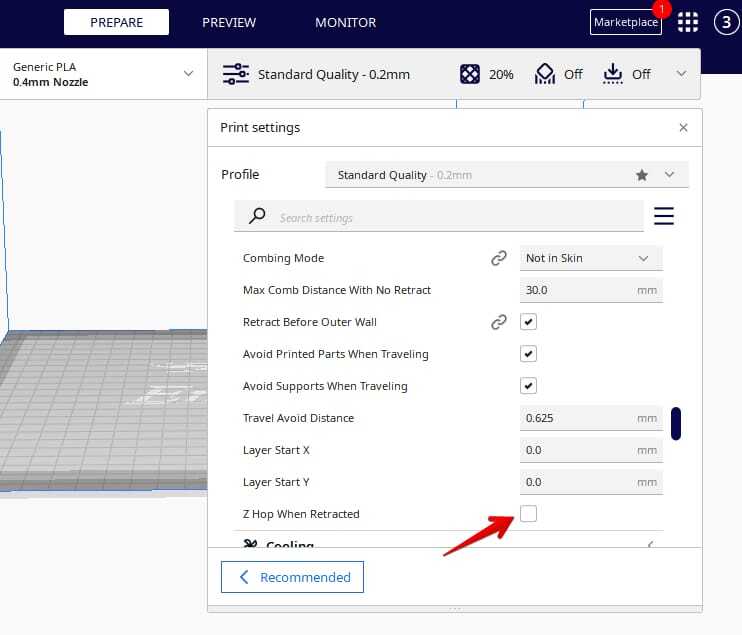
A Z-hop, also known as Z-lift, is a feature that lifts the nozzle a small amount (typically 0.1-0.5mm) vertically before the print head moves to a new location. This prevents the nozzle from accidentally dragging across or colliding with previously printed sections of the model, especially on uneven or complex top surfaces.Implementing a Z-hop can significantly reduce the risk of print damage and improve the overall finish of the top layer by avoiding unwanted physical interactions.
- Enable Z-hop: This setting is usually found within your slicer’s “Travel” or “Movement” settings.
- Set Z-hop Height: Start with a small value, such as 0.2mm, and increase it if you notice nozzle collisions or scraping.
- Z-hop Retraction: Some slicers allow you to combine Z-hop with retraction, where the filament is retracted before lifting and un-retracted after descending. This can further reduce stringing.
It’s important to note that while Z-hop helps prevent collisions, excessive Z-hop can increase print time and potentially introduce minor artifacts due to the added travel moves.
Post-Processing for a Smooth Top Surface
Even with perfect printing, some post-processing can enhance the smoothness of your top layer. These techniques involve physically altering the surface of the print to achieve a desired finish.The choice of post-processing method depends on the filament type and the desired level of smoothness.
- Sanding: This is a common method for many plastics. Start with a coarser grit sandpaper (e.g., 200-400 grit) to remove any significant imperfections and gradually move to finer grits (e.g., 800-2000 grit or higher) to achieve a smooth finish. Wet sanding, where sandpaper is used with water, can help reduce dust and create a finer finish.
- Chemical Smoothing: Certain filaments, like ABS, can be smoothed using solvents. Acetone vapor smoothing is a popular technique for ABS. This involves exposing the print to acetone vapor, which melts and re-flows the outer layer, creating a very smooth surface. This process requires careful handling of chemicals and proper ventilation. Other filaments may have specific chemical smoothing agents.
- Filling and Priming: For very minor imperfections, a thin layer of filler primer can be applied, allowed to dry, and then sanded smooth. This is often a precursor to painting.
Applying a Clear Coat for an Ultra-Smooth Finish
Applying a clear coat is an excellent way to achieve an ultra-smooth, glossy, and protected top surface. This method seals the print and provides a uniform, high-quality finish.This process is best suited for prints that have already undergone initial smoothing (e.g., sanding) and are free from major defects.
- Prepare the Print: Ensure the print is clean, dust-free, and any sanding marks have been addressed. If you are aiming for a mirror-like finish, ensure the surface is as smooth as possible before this step.
- Choose Your Clear Coat: Select a high-quality clear coat. Acrylic lacquers or polyurethane clear coats are common choices for 3D prints. Ensure the clear coat is compatible with your filament material. For glossy finishes, opt for a gloss clear coat; for a matte finish, a matte clear coat is appropriate.
- Apply in a Well-Ventilated Area: Work in a well-ventilated space or outdoors to avoid inhaling fumes. Protect your work surface.
- Apply Thin, Even Coats: Hold the spray can at the recommended distance (usually 8-12 inches) from the print. Apply the clear coat in light, even passes, moving consistently across the surface. Avoid applying too much in one area, which can cause drips or runs.
- Allow Drying Time: Let each coat dry thoroughly according to the product’s instructions. This is crucial for preventing imperfections. For most spray paints, this can range from 15 minutes to an hour between coats.
- Build Up Layers: Apply multiple thin coats rather than one thick coat. Typically, 3-5 coats are sufficient for a durable and smooth finish.
- Curing: After the final coat, allow the clear coat to fully cure. This can take 24-72 hours, depending on the product and environmental conditions. During this time, avoid touching or handling the print unnecessarily.
- Optional: Wet Sanding and Polishing: For an exceptionally smooth, high-gloss finish, after the clear coat has fully cured, you can carefully wet sand with very fine grit sandpaper (e.g., 2000-4000 grit) and then use a polishing compound to bring out a mirror-like shine.
Common Issues and Troubleshooting for Top Surface Imperfections
Even with careful preparation and optimized settings, achieving a perfectly smooth top surface can sometimes present challenges. Understanding the common issues and their underlying causes is crucial for effective troubleshooting and achieving the desired flawless finish. This section will guide you through identifying these imperfections and implementing the necessary solutions.Identifying common top surface problems involves a keen eye for visual cues that deviate from a uniform, smooth finish.
These imperfections can manifest in various ways, each pointing to a specific underlying printing or material issue.
Visual Cues of Common Top Surface Problems
Observing the details of your print’s top surface is the first step in diagnosing problems. Several common visual indicators can help pinpoint the source of the imperfection.
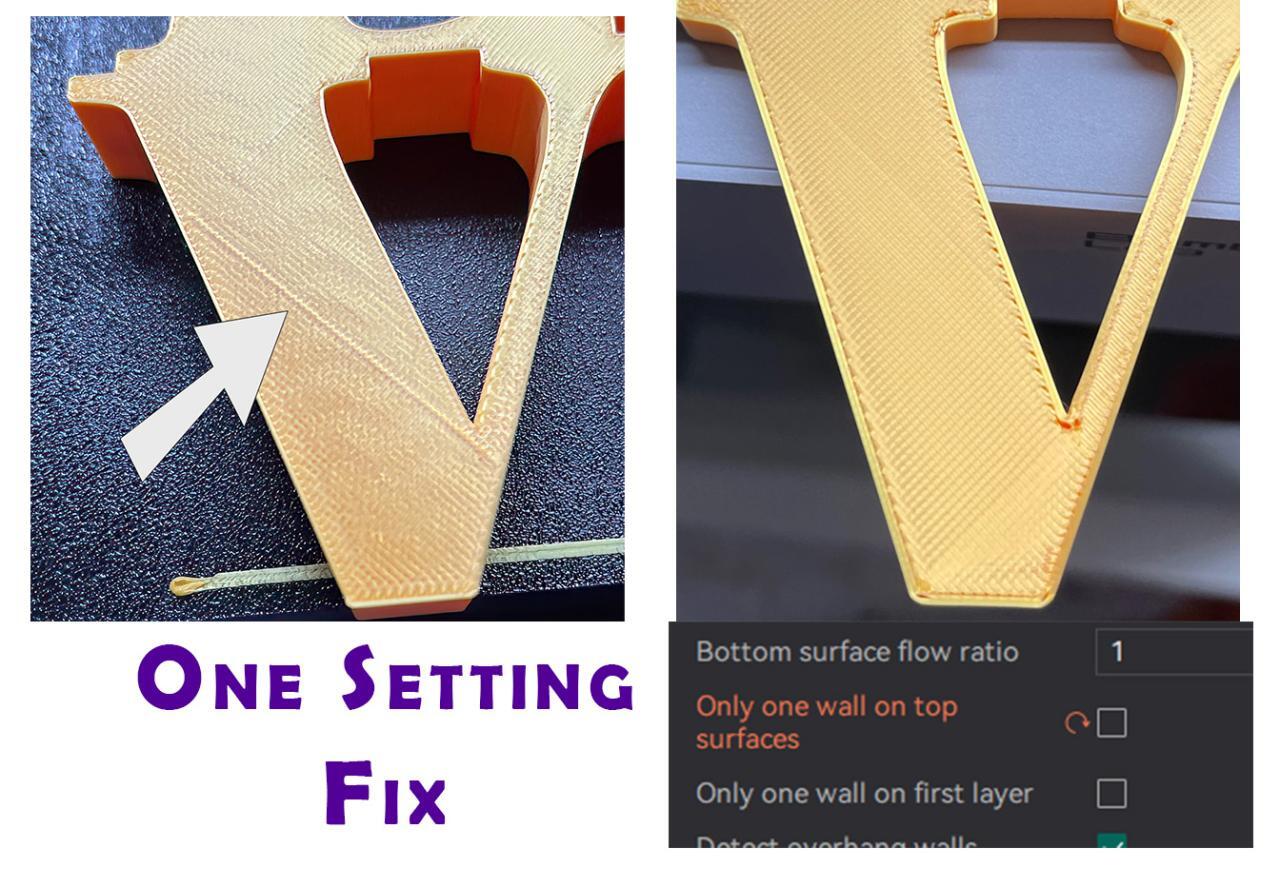
- Gaps: These appear as small holes or unprinted lines between the infill or perimeters on the top layer. They indicate that insufficient filament is being deposited.
- Ridges/Bumps: These are raised lines or uneven bumps that protrude from the surface. They often result from too much filament being extruded or filament being deposited too close together.
- Unevenness/Warping: The top surface may not be perfectly flat, showing dips, waves, or a general lack of uniformity. This can be caused by temperature fluctuations, cooling issues, or material properties.
- Stringing/Oozing: Fine threads of filament can appear on the surface, often a byproduct of retraction settings or filament moisture.
- Layer Shifting: While not strictly a top surface issue, significant layer shifts can cause a very rough and uneven top surface.
Addressing Under-extrusion Leading to Gaps
Under-extrusion occurs when the printer deposits less filament than required, resulting in gaps on the top layer. This is a common cause of weak and visually unappealing surfaces.The primary goal when addressing under-extrusion is to ensure the correct amount of filament is consistently fed through the nozzle. This can be achieved by adjusting several printer settings and verifying filament path integrity.
- Flow Rate/Extrusion Multiplier: This setting directly controls the amount of filament extruded. Increasing it slightly (e.g., by 2-5%) can often resolve minor under-extrusion. Calibrating your E-steps is also a fundamental step to ensure your extruder pushes the correct length of filament.
- Nozzle Temperature: Ensure your nozzle temperature is within the recommended range for your filament. If it’s too low, the filament may not melt and flow properly.
- Print Speed: Reducing print speed, especially for the top layer, allows more time for the filament to be deposited accurately.
- Filament Diameter: Verify that your slicer’s filament diameter setting matches the actual diameter of your filament. Inaccurate settings can lead to incorrect extrusion amounts.
- Nozzle Clog: A partial nozzle clog can restrict filament flow, mimicking under-extrusion. Perform a cold pull or use a nozzle cleaning needle to clear any obstructions.
- Extruder Tension: Ensure the extruder idler arm is applying sufficient pressure to grip the filament and push it towards the hotend.
Resolving Over-extrusion Causing Bumps and Ridges
Over-extrusion is the opposite of under-extrusion, where too much filament is deposited, leading to excess material that creates bumps, ridges, and an overall rough surface.Correcting over-extrusion requires a reduction in the amount of filament being pushed through the nozzle. This can be achieved through careful calibration and setting adjustments.
- Flow Rate/Extrusion Multiplier: Decrease the flow rate or extrusion multiplier in your slicer. Small adjustments (e.g., by 2-5%) are usually sufficient.
- Extrusion Width: While often linked to flow rate, the extrusion width setting in your slicer can also contribute. If set too high, it can lead to overlapping lines and ridges.
- Nozzle Temperature: While less common, excessively high nozzle temperatures can cause filament to expand more than expected, leading to over-extrusion.
- Z-Height: Ensure your initial layer Z-height is set correctly. If the nozzle is too close to the bed, it can cause filament to squeeze out and create ridges on subsequent layers.
- Retraction Settings: While primarily for stringing, aggressive retraction can sometimes lead to minor over-extrusion at the start of a travel move if not tuned properly.
Troubleshooting Warped Top Surfaces and Suggested Remedies
Warping on the top surface, where it becomes uneven or lifts, is often related to inconsistent cooling or thermal stress within the printed part.Addressing warped top surfaces requires managing temperature and airflow to ensure even cooling and prevent stresses from building up.
- Cooling Fan Speed: For materials like PLA, adequate cooling is essential. Ensure your part cooling fan is set to an appropriate speed for the top layers. However, for materials like ABS or PETG, excessive cooling can cause adhesion issues and warping.
- Bed Adhesion: A strong initial bed adhesion is crucial for preventing warping throughout the print. Ensure your build plate is clean and use appropriate adhesion aids if necessary.
- Ambient Temperature: Drafts or significant temperature fluctuations in the printing environment can cause uneven cooling. Consider using an enclosure to maintain a stable ambient temperature, especially for materials prone to warping.
- Print Orientation: Sometimes, orienting the part differently on the build plate can alleviate stresses that lead to warping.
- First Layer Squish: A well-calibrated first layer that is slightly “squished” into the build plate provides a solid foundation and reduces the likelihood of warping on subsequent layers.
Dealing with Inconsistent Extrusion Width Affecting Surface Texture
Inconsistent extrusion width, where the line of extruded filament varies in thickness, directly impacts the smoothness and uniformity of the top surface. This can lead to a textured or striated appearance rather than a solid, smooth finish.Achieving consistent extrusion width relies on a combination of mechanical integrity, proper calibration, and filament quality.
- Filament Quality and Consistency: Variations in filament diameter are a common cause of inconsistent extrusion width. Ensure you are using high-quality filament from reputable manufacturers. Using a digital caliper to measure filament diameter at multiple points can reveal inconsistencies.
- Extruder Calibration (E-steps): As mentioned earlier, accurate E-step calibration ensures the extruder motor pushes the correct amount of filament.
- Nozzle Wear: Over time, the nozzle can wear down, especially when printing abrasive materials. A worn nozzle can lead to inconsistent extrusion. Consider replacing the nozzle if you suspect wear.
- Filament Path Obstructions: Any friction or obstruction in the filament path from the spool to the nozzle can cause inconsistent feeding. Ensure the filament spool rotates freely and the path through the extruder and Bowden tube (if applicable) is smooth.
- Print Speed and Acceleration: Very high print speeds or aggressive acceleration settings can sometimes lead to the extruder struggling to keep up, resulting in inconsistent extrusion.
- Slicer Settings: Review your slicer settings for extrusion width. While generally set automatically, ensuring it’s appropriate for your nozzle size is important.
Designing Models for Enhanced Top Surface Quality
Crafting your 3D models with the final print surface in mind is a powerful strategy to achieve excellent top layer finishes. By making conscious design choices, you can significantly reduce the complexity of printing and the likelihood of imperfections, leading to a smoother, more aesthetically pleasing result right from the design stage.
Model Orientation Impact on Top Surface Finish
The orientation of a 3D model on the print bed plays a critical role in how the top surface is formed. Different orientations expose different cross-sections to the slicing software, influencing the number and pattern of top layers, as well as the potential for bridging and overhangs that can compromise surface quality.
Factors Influenced by Orientation:
- Number of Top Layers: A flatter orientation generally requires fewer top layers to achieve solidity, which can result in a smoother finish as there are fewer extrusion paths to align.
- Bridging and Overhangs: Orienting a model so that the intended top surface is largely horizontal and supported from below minimizes the need for the printer to bridge gaps or support steep overhangs, both of which can lead to rough surfaces.
- Layer Line Visibility: While primarily affecting side surfaces, orientation can indirectly influence the top surface by dictating the direction of the final few layers, which might become visible if the top surface is not perfectly flat.
Design Considerations for Minimal Top Layers and Overhangs
Thoughtful design can proactively minimize the reliance on extensive top layers and the occurrence of problematic overhangs. By simplifying the geometry where the top surface will be, you inherently create a more printable and visually superior outcome.
Strategies for Simplification:
- Flat, Horizontal Surfaces: Design the top of your model to be as flat and horizontal as possible. This allows for clean, single-pass top layers.
- Avoiding Steep Angles: Minimize the use of steep angles or sharp inclines on surfaces that will become the top of the print. Gradual slopes are much easier to print smoothly.
- Incorporating Support Structures Internally: If complex internal geometry is unavoidable, consider designing it in a way that provides some self-support for the top surface, rather than relying solely on external print supports.
Strategies for Creating Inherently Self-Supporting Top Surfaces
The ultimate goal in design for smooth top surfaces is to create models that naturally support their own top layers, eliminating the need for any additional support material. This often involves clever geometric solutions.
Self-Support Techniques:
- Chamfered or Filleted Edges: Applying chamfers or fillets to edges that will form the top surface can create a gradual transition that is easier for the printer to bridge or build upon, effectively self-supporting.
- Inverted Designs: Sometimes, inverting a design or printing it upside down can transform a difficult overhang into a flat, printable surface.
- Modular Designs: For larger or more complex objects, consider breaking them into smaller modules that can be printed with their top surfaces oriented optimally, then assembled.
Benefits of Adding Chamfers or Fillets to Top Surface Edges
Chamfers and fillets are not just aesthetic choices; they are functional design elements that can dramatically improve the printability and finish of top surfaces. They provide a gradual slope, which is far more forgiving for FDM printers than a sharp 90-degree angle.
Advantages of Edge Treatments:
- Reduced Stress Concentration: Sharp corners can be points of stress, leading to cracking or delamination. Chamfers and fillets distribute stress more evenly.
- Improved Layer Adhesion: The angled surfaces created by chamfers and fillets allow for better layer-to-layer adhesion compared to printing directly onto a sharp edge.
- Minimized Need for Supports: By creating a sloped transition, the printer can often build the top surface without requiring dedicated support structures.
Model Orientation and Top Surface Outcome Example
Consider a simple cube with a shallow, inverted pyramid shape carved into its top surface. If printed in its standard upright orientation, the inverted pyramid would require significant support material or could result in a rough, stringy top surface due to bridging challenges. However, if the model is rotated 180 degrees and printed upside down, the inverted pyramid becomes a naturally supported, flat surface, leading to a perfectly smooth finish for what was originally the bottom of the model.
Changing a model’s orientation from a configuration requiring complex overhangs on its top surface to one that presents a flat, horizontal plane for printing can transform a potentially flawed print into a flawless one.
Ultimate Conclusion
In conclusion, mastering the art of a smooth top surface on your 3D prints is an attainable goal through a combination of meticulous printer calibration, thoughtful filament selection, and strategic model design. By implementing the best practices and advanced techniques discussed, you can consistently produce prints that not only function flawlessly but also possess a professional, polished finish. Embrace these insights to transform your prints from functional prototypes to showcase-worthy pieces.