How to Get Started with PETG Filament unveils a comprehensive journey into mastering this versatile 3D printing material. We will explore its unique properties, delve into the necessary equipment and optimal settings, and equip you with solutions for common challenges, ultimately empowering you to create exceptional prints.
This guide is meticulously crafted to transform your PETG printing experience from tentative exploration to confident creation. Whether you are a beginner seeking foundational knowledge or an experienced user aiming to refine your techniques, our detailed breakdown covers everything from understanding filament composition to achieving professional-grade finishes and discovering the vast array of applications PETG enables.
Understanding PETG Filament for 3D Printing
Polyethylene Terephthalate Glycol-modified (PETG) has emerged as a highly popular filament choice for 3D printing enthusiasts and professionals alike. Its unique blend of desirable properties bridges the gap between the ease of printing of PLA and the robust performance of ABS, making it an excellent option for a wide range of applications. Understanding its fundamental characteristics is key to unlocking its full potential in your 3D printing projects.PETG filament is a thermoplastic derived from PET (Polyethylene Terephthalate), the same material used in many plastic bottles.
The addition of glycol during the manufacturing process modifies the PET, resulting in a filament that is less brittle and more durable than standard PET. This modification significantly enhances its printability and the mechanical performance of the printed parts.
PETG Filament Properties and Advantages
PETG offers a compelling set of properties that make it a superior choice for many applications compared to other common filaments. Its balanced characteristics provide a user-friendly printing experience coupled with strong, functional prints.Key advantages of PETG include:
- Durability and Strength: PETG is significantly stronger and more durable than PLA, offering excellent layer adhesion and resistance to impact.
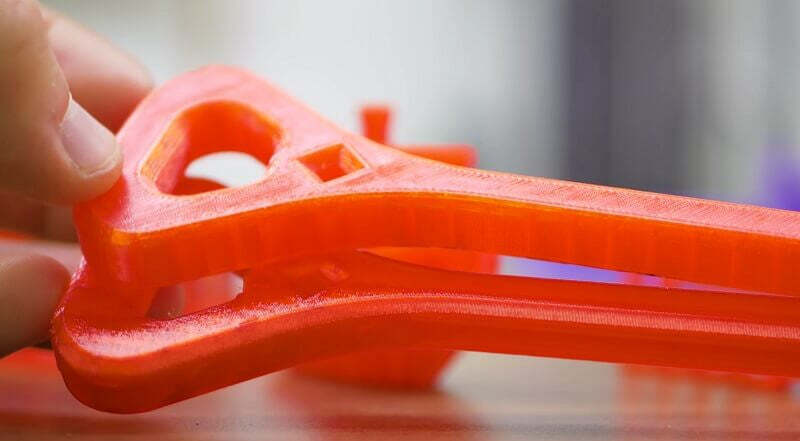
- Flexibility: While not as flexible as some specialized filaments, PETG possesses a degree of flexibility that prevents it from shattering under stress, unlike brittle PLA.
- Chemical Resistance: It exhibits good resistance to water, acids, and alkalis, making it suitable for functional parts exposed to various substances.
- Temperature Resistance: PETG has a higher glass transition temperature than PLA, allowing it to withstand warmer environments without deforming.
- Food Safety: Certain PETG filaments are certified as food-safe, making them suitable for applications like food containers and kitchenware, provided the printer and environment are also food-safe.
- Low Warp: Compared to ABS, PETG exhibits minimal warping during printing, simplifying the printing process and reducing the need for heated enclosures.
- Minimal Odor: PETG prints with very little odor, unlike ABS which can produce strong fumes.
Chemical Composition and Manufacturing Process
PETG is a copolymer, meaning it is made from two or more different monomers. The primary components are terephthalic acid and ethylene glycol, which are polymerized to form PET. The “G” in PETG signifies the addition of a small percentage of a glycol, typically cyclohexanedimethanol (CHDM), during the polymerization process. This glycol modification disrupts the crystalline structure of PET, leading to amorphous PET, which is the basis of PETG.The manufacturing process typically involves:
- Monomer Synthesis: Terephthalic acid and ethylene glycol are reacted to form bis(2-hydroxyethyl) terephthalate (BHET).
- Polycondensation: BHET undergoes a polycondensation reaction at high temperatures and reduced pressure to form PET.
- Glycol Modification: During or after the PET formation, CHDM is introduced and copolymerized, disrupting the chain regularity and preventing crystallization.
- Extrusion and Pelletizing: The resulting PETG polymer is then extruded into strands, cooled, and cut into pellets.
- Filament Extrusion: These pellets are then melted and extruded through a die to form the filament of the desired diameter, which is then cooled and spooled.
Mechanical Property Comparison of PETG, PLA, and ABS
To better understand PETG’s position in the 3D printing filament landscape, a comparison of its mechanical properties with those of PLA and ABS is presented below. This table highlights the key differences that influence filament selection for specific applications.
| Property | PLA | PETG | ABS |
|---|---|---|---|
| Tensile Strength (MPa) | 50-60 | 45-60 | 45-60 |
| Flexural Strength (MPa) | 70-80 | 60-70 | 60-70 |
| Impact Resistance (Izod, J/m) | 20-50 | 80-150 | 50-100 |
| Elongation at Break (%) | 2-5 | 10-30 | 5-15 |
| Hardness (Shore D) | 80-90 | 80-85 | 80-85 |
| Heat Deflection Temperature (°C) | 50-60 | 70-80 | 90-100 |
| UV Resistance | Poor | Good | Poor |
| Chemical Resistance | Poor | Good | Moderate |
Essential Equipment and Setup for PETG Printing
Transitioning to PETG filament for your 3D printing projects opens up a world of possibilities due to its impressive strength, flexibility, and temperature resistance. However, to achieve optimal results and avoid common printing pitfalls, a few adjustments to your printer’s setup and equipment are essential. This section will guide you through the critical considerations for successfully printing with PETG.Successfully printing with PETG often requires a printer that can handle slightly higher temperatures and maintain a stable environment.
While many modern 3D printers can handle PETG out of the box, understanding specific settings and potential modifications will significantly improve your print quality and reliability.
Printer Modifications and Settings for PETG
PETG filament generally requires higher printing temperatures compared to PLA, and managing its stringing tendencies is crucial. Adjusting retraction settings, print speed, and cooling fan speed are key to overcoming these challenges.* Nozzle Temperature: PETG typically prints best between 230°C and 250°C. It’s important to perform temperature tower tests to find the sweet spot for your specific filament brand and printer.
Bed Temperature
A heated bed is essential for PETG adhesion. Aim for a bed temperature between 70°C and 90°C.
Print Speed
Slower print speeds, generally between 40-60 mm/s, help ensure proper layer adhesion and reduce the likelihood of extrusion issues.
Retraction Settings
PETG is prone to stringing. You may need to experiment with retraction distance and speed. A common starting point is a retraction distance of 5-7 mm and a speed of 40-50 mm/s. Some users find that slightly lower retraction speeds can also help.
Cooling Fan Speed
Unlike PLA, PETG benefits from less aggressive cooling. Start with the cooling fan at 30-50% for most prints, and potentially lower for the initial layers to promote bed adhesion. Excessive cooling can lead to poor layer bonding.
Z-Seam Alignment
For cleaner prints, consider aligning the Z-seam to a specific location, such as the sharpest corner of your model, to minimize its visual impact.
Build Surface Materials and Adhesion Methods for PETG
Achieving reliable adhesion is paramount when printing with PETG to prevent prints from detaching mid-print or damaging your build plate. The right surface and adhesion aid can make a significant difference.Several build surface materials and adhesion methods are well-suited for PETG, offering a balance between strong adhesion during printing and ease of removal once the print is complete.
- PEI Sheet: A smooth or textured PEI (Polyetherimide) sheet is an excellent choice for PETG. It provides good adhesion when heated and prints typically pop off easily once the bed cools down.
- Glass Bed: A standard glass build plate can work well, especially when paired with an adhesion aid. Ensure it is clean and level.
- BuildTak or Similar Surfaces: These specialized build surfaces offer good grip for PETG.
- Blue Painter’s Tape: While less common for PETG than PLA, a layer of blue painter’s tape can provide sufficient adhesion, especially when combined with a thin layer of glue stick.
When using a glass or PEI bed, consider these adhesion methods:
- Glue Stick: A thin, even layer of washable glue stick (like Elmer’s) applied to the build surface before printing is a very effective method for PETG. It creates a sacrificial layer that releases easily.
- Hairspray: A light coating of unscented hairspray can also enhance adhesion on glass or PEI surfaces.
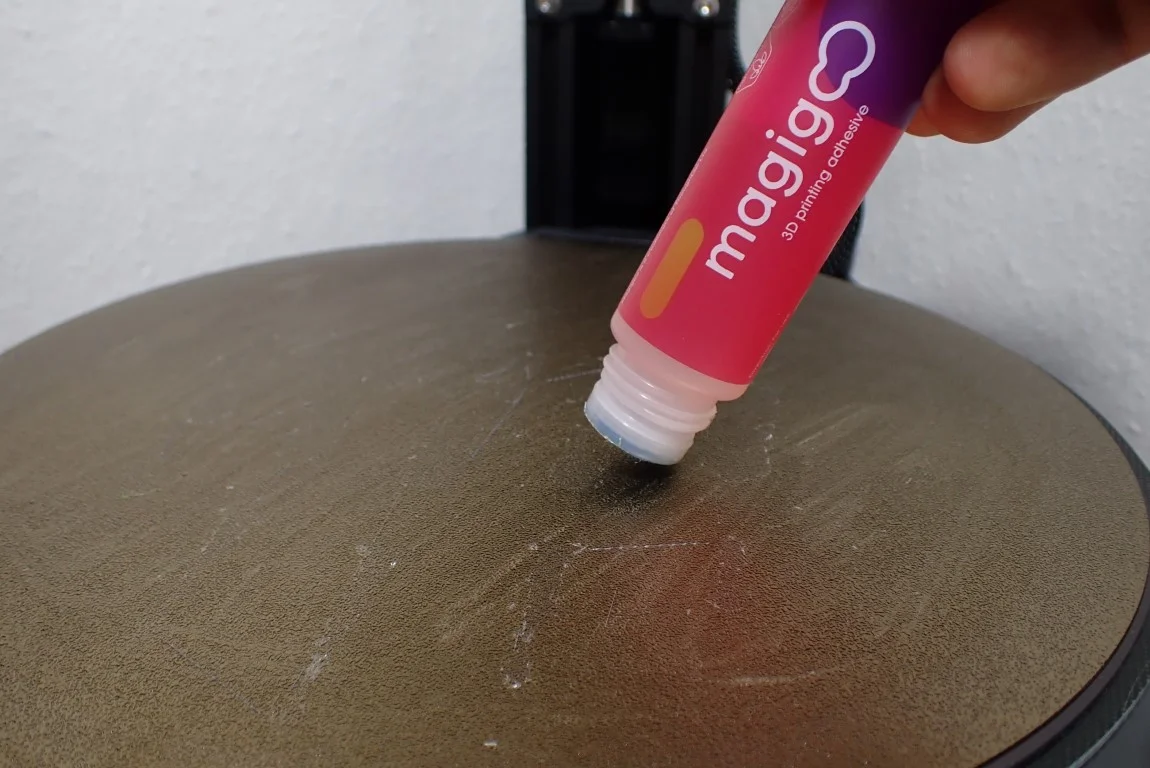
- Specialty Adhesives: Products like Magigoo PETG are specifically formulated to provide optimal adhesion and easy release for PETG.
It is crucial to clean your build surface thoroughly between prints using isopropyl alcohol (IPA) to remove any residue that might affect adhesion.
Ambient Temperature and Ventilation Requirements for PETG
While PETG is less prone to warping than ABS, maintaining a stable ambient temperature and ensuring adequate ventilation are still important for consistent print quality and safety.PETG can be sensitive to drafts and significant temperature fluctuations, which can lead to uneven cooling and potential print failures. Proper ventilation is also recommended due to the slight odor and potential release of VOCs (Volatile Organic Compounds) during printing.
- Ambient Temperature: Aim for a stable ambient temperature in your printing environment, ideally between 20°C and 25°C. Avoiding significant drafts from open windows or air conditioning vents is crucial.
- Enclosure: While not strictly necessary for all PETG prints, an enclosure can significantly improve print consistency by maintaining a stable temperature around the print. This is particularly beneficial for larger prints or in environments with fluctuating temperatures.
- Ventilation: Printing PETG can produce a faint, sweet odor. While generally considered less problematic than ABS, it’s good practice to ensure your printing area is well-ventilated. This can be achieved through open windows, a ventilation fan, or an air purifier with a HEPA and activated carbon filter.
Optimal Printing Parameters for PETG
Now that you have a solid understanding of PETG filament and your equipment is ready, let’s delve into the crucial printing parameters that will significantly impact the quality and success of your PETG prints. Fine-tuning these settings is key to overcoming common PETG printing challenges and achieving strong, aesthetically pleasing results.Understanding and applying the correct printing parameters is paramount for a successful PETG printing experience.
These settings directly influence the filament’s behavior during extrusion, adhesion, and cooling, ultimately determining the strength, detail, and surface finish of your 3D prints.
Nozzle and Bed Temperature Recommendations
Achieving optimal adhesion and preventing print failures relies heavily on setting the correct temperatures for both the nozzle and the print bed. These temperatures influence how the PETG melts and solidifies, affecting its flow and its ability to bond to the build surface and subsequent layers.The recommended temperature ranges are a starting point, and minor adjustments may be necessary based on your specific printer, filament brand, and environmental conditions.
- Nozzle Temperature: For most PETG filaments, a nozzle temperature between 230°C and 250°C is ideal. Some manufacturers may suggest slightly higher or lower ranges, so always consult your filament’s specifications. A temperature that is too low can lead to poor layer adhesion and under-extrusion, while a temperature that is too high can cause excessive stringing, oozing, and degradation of the filament.
- Bed Temperature: A heated bed is essential for PETG to ensure good first-layer adhesion and prevent warping. The recommended bed temperature typically falls between 70°C and 90°C. Using a brim or raft can further enhance adhesion, especially for larger prints or those with a small contact area. Some users find success with temperatures as low as 60°C or as high as 100°C, but the 70-90°C range is a reliable starting point.
Impact of Print Speed on PETG Print Quality
Print speed is a critical factor that influences the quality of PETG prints, affecting details, layer adhesion, and the likelihood of print defects. PETG generally requires slower print speeds compared to PLA to allow for proper melting, extrusion, and cooling.Slower print speeds allow the molten PETG more time to flow and adhere to the previous layer, resulting in stronger and more cohesive prints.
Conversely, excessively high speeds can lead to under-extrusion, poor layer bonding, and artifacts like ghosting or ringing.
- Optimal Ranges: For most PETG prints, a print speed between 40 mm/s and 60 mm/s is recommended. For outer walls and detailed sections, even slower speeds, such as 25-40 mm/s, can yield superior surface finishes. The first layer should always be printed at a slower speed, typically around 20-30 mm/s, to ensure excellent bed adhesion.
- Bridging and Travel Moves: For bridging and travel moves, slightly higher speeds might be acceptable, but it’s generally advisable to keep them moderate to minimize stringing.
Recommended Retraction Settings for PETG
Stringing and oozing are common challenges when printing with PETG, and proper retraction settings are crucial to mitigate these issues. Retraction involves pulling the filament back into the nozzle during non-printing travel moves, preventing molten plastic from dripping onto the print.Implementing precise retraction settings requires a systematic approach to find the sweet spot for your specific filament and printer. This process often involves iterative testing.
Step-by-step procedure for dialing in retraction settings:
- Start with a Baseline: Begin with conservative retraction settings. A common starting point is a retraction distance of 5-7 mm and a retraction speed of 25-45 mm/s.
- Print a Retraction Test: Utilize retraction test models available on platforms like Thingiverse or Printables. These models typically consist of a series of towers or spikes designed to highlight stringing.
- Analyze the Test Print: Carefully examine the test print for any visible strings or blobs of filament between the printed sections.
- Adjust Retraction Distance: If stringing is present, gradually increase the retraction distance by 0.5 mm to 1 mm increments. If the stringing is reduced or eliminated, proceed to the next step. If stringing persists or if you notice grinding sounds from your extruder, you may have set the distance too high.
- Adjust Retraction Speed: If stringing remains an issue even with an increased distance, try increasing the retraction speed by 5-10 mm/s increments. A speed that is too high can cause filament grinding or skipping in the extruder.
- Iterate and Refine: Continue to print retraction tests and adjust the distance and speed incrementally until you achieve a print with minimal to no stringing.
- Consider Coasting and Wipe: Some slicers offer “coasting” and “wipe” features, which can further help reduce oozing. Coasting involves stopping filament extrusion slightly before the end of a travel move, and wiping moves the nozzle a small distance before retracting. Experiment with these settings if stringing is still a persistent problem.
It’s important to note that the optimal retraction settings can vary significantly between different PETG brands and even between different colors of the same brand.
Importance of Layer Height and its Effect on PETG Print Strength and Detail
Layer height is a fundamental setting that dictates the vertical resolution of your 3D prints and has a direct impact on both the mechanical strength and the fine details of PETG objects. The choice of layer height involves a trade-off between print time, detail fidelity, and structural integrity.A smaller layer height results in finer detail and a smoother surface finish, but it also increases print time.
Conversely, a larger layer height reduces print time but can lead to visible layer lines and potentially weaker prints if adhesion between layers is compromised.
- Detail and Surface Finish: For prints requiring intricate details, smooth curves, and a high-quality surface finish, a smaller layer height is recommended. Typical values range from 0.1 mm to 0.15 mm. This setting allows the nozzle to lay down finer strands of filament, capturing subtle features more accurately.
- Print Strength: For parts that require maximum strength, a slightly larger layer height can sometimes be beneficial, provided that good layer adhesion is maintained. Layer heights between 0.2 mm and 0.25 mm are commonly used for functional parts. The increased thickness of each layer can lead to better inter-layer bonding, resulting in a stronger overall part. However, it’s crucial to ensure that your other printing parameters, especially nozzle temperature and print speed, are optimized to achieve excellent adhesion at these larger layer heights.
- Balancing Act: The ideal layer height is often a balance between the desired level of detail and the required strength for the specific application. For general-purpose printing, a layer height of 0.2 mm often provides a good compromise between detail, strength, and print time.
Common PETG Printing Challenges and Solutions
While PETG offers excellent mechanical properties and ease of printing compared to some other advanced filaments, it’s not entirely immune to challenges. Understanding these common issues and their solutions will significantly improve your PETG printing success rate. This section will guide you through identifying and resolving the most frequent problems.PETG can sometimes present unique printing difficulties that require specific attention.
By proactively addressing these, you can ensure smooth and successful prints, leveraging PETG’s strengths to their fullest.
Stringing and Oozing
Stringing, often described as fine wisps of filament connecting different parts of a print, is a common issue with PETG. It occurs when molten filament is drawn out of the nozzle as the print head moves between separate print areas. Oozing is a related problem where filament leaks from the nozzle when it’s not actively extruding.To mitigate stringing and oozing, several adjustments can be made:
- Retraction Settings: This is the most crucial factor. Increase retraction distance and speed. A good starting point for retraction distance is 5-7 mm for Bowden extruders and 0.5-2 mm for direct drive extruders. For retraction speed, aim for 40-60 mm/s. Experimentation is key, as optimal settings vary between printers and filament brands.
- Printing Temperature: While PETG generally prints hotter than PLA, printing at the lower end of its recommended temperature range can reduce oozing. Ensure your hotend is consistently at the set temperature.
- Travel Speed: Increasing the travel speed (the speed at which the nozzle moves when not extruding) can reduce the time available for filament to ooze out.
- Wipe and Coasting: Some slicers offer “wipe” or “coasting” settings. Wipe moves the nozzle slightly back and forth after an extrusion move, and coasting allows the nozzle to travel a short distance after extrusion stops, using residual pressure to pull filament back.
- Dry Filament: PETG is hygroscopic, meaning it absorbs moisture from the air. Wet filament can lead to inconsistent extrusion and increased stringing. Ensure your PETG filament is properly dried before printing.
Warping and Bed Adhesion
Warping, where the corners or edges of a print lift off the build plate, is another challenge, although generally less severe with PETG than with ABS. Poor bed adhesion can lead to warping and failed prints. PETG’s slightly lower adhesion compared to PLA can be a factor.To improve bed adhesion and prevent warping:
- Build Plate Surface: A clean build plate is essential. For PETG, surfaces like PEI sheets, glass with an adhesive (like gluestick or hairspray), or textured build plates often work well.
- Bed Temperature: Maintain a consistent bed temperature, typically between 70-85°C. This helps keep the bottom layers of the print warm and less prone to contracting and lifting.
- First Layer Squish: Ensure your first layer is properly “squished” onto the build plate. This creates a strong bond. Adjust your Z-offset or bed leveling accordingly.
- Enclosure (Optional but Recommended): While not always necessary for PETG, using an enclosure can help maintain a stable ambient temperature around the print, reducing temperature gradients that cause warping.
- Cooling Fan: Be cautious with the part cooling fan for the initial layers. Turning it off or setting it to a very low speed for the first few layers can significantly improve adhesion and reduce warping. Gradually increase fan speed for subsequent layers as needed.
Poor Layer Adhesion
While PETG is known for good layer adhesion, under-extrusion or incorrect temperature settings can lead to weak bonds between layers, resulting in prints that are brittle or easily delaminate.To ensure strong layer adhesion:
- Printing Temperature: Printing at the higher end of PETG’s recommended temperature range generally promotes better layer adhesion. Ensure your hotend is calibrated and consistently reaching the target temperature.
- Extrusion Multiplier/Flow Rate: Calibrate your extruder’s flow rate to ensure the correct amount of filament is being extruded. Over- or under-extrusion will negatively impact layer bonding.
- Print Speed: Printing too fast can lead to insufficient melt and bonding between layers. Reduce print speed, especially for outer walls and infill, if layer adhesion is an issue.
- Layer Height: While not the primary cause, very thin layer heights might sometimes struggle to fuse as effectively as slightly thicker layers.
Blocked Nozzle
PETG’s slightly stringy nature and tendency to degrade at very high temperatures can, in rare cases, lead to nozzle clogs, especially if foreign particles are present or if the filament has been exposed to excessive heat.To prevent and address nozzle clogs:
- Filament Quality: Use high-quality PETG filament from reputable manufacturers. Ensure the filament diameter is consistent.
- Nozzle Cleaning: Perform cold pulls regularly to remove any residual filament or debris from the nozzle.
- Filament Path: Ensure the filament path from the spool to the hotend is smooth and free of obstructions.
- Printing Temperature: Avoid printing significantly above the recommended temperature, as this can degrade the filament and lead to clogs.
- Heat Creep: Ensure your hotend cooling fan is functioning correctly. Heat creep can cause filament to soften too high up in the hotend, leading to clogs.
PETG Printing Troubleshooting Decision Tree
To help diagnose and resolve common PETG printing issues, consider the following decision tree. Start at the top and follow the path based on the problem you are experiencing.
| Problem | Potential Causes | Solutions |
|---|---|---|
| Stringing/Oozing | Retraction settings too low | Increase retraction distance and speed. |
| Printing temperature too high | Lower printing temperature slightly. | |
| Wet filament | Dry the filament thoroughly. | |
| Warping/Poor Bed Adhesion | Bed temperature too low | Increase bed temperature. |
| First layer not properly squished | Adjust Z-offset/bed leveling for a good first layer “squish”. | |
| Insufficient build plate cleaning | Clean the build plate thoroughly. | |
| Excessive part cooling on initial layers | Turn off or reduce fan speed for the first few layers. | |
| Poor Layer Adhesion | Printing temperature too low | Increase printing temperature. |
| Under-extrusion | Calibrate flow rate/extrusion multiplier. | |
| Printing too fast | Reduce print speed. | |
| Nozzle Clog | Filament debris or degradation | Perform cold pull, check filament quality. |
| Heat creep | Ensure hotend cooling fan is working. |
Post-Processing PETG Prints
Once your PETG prints have cooled and been successfully removed from the build plate, the journey isn’t over. Post-processing is crucial for achieving a polished, professional look and ensuring your prints are ready for their intended application. This stage involves cleaning, refining surfaces, and preparing parts for assembly or display.PETG’s unique properties, such as its strength and slight flexibility, can influence how it responds to various post-processing techniques.
Understanding these nuances will help you avoid common pitfalls and achieve excellent results.
Cleaning and Preparing Prints
Removing support structures and any residual filament or adhesive from the build plate are the first steps in post-processing. PETG can sometimes adhere strongly to the build surface, so careful removal is essential to prevent damage to the print.Here are some common methods for cleaning and preparing PETG prints:
- Support Removal: For most PETG prints, supports can be carefully snapped or cut away using flush cutters, pliers, or a hobby knife. Take your time to avoid breaking delicate features of the print. For more intricate supports, a gentle twisting motion can sometimes help break them free.
- Adhesive Residue: If you used an adhesive like glue stick or hairspray, it can usually be washed off with warm water and soap. For stubborn residues, isopropyl alcohol (IPA) can be effective.
- Stringing Removal: Small strands of filament, often referred to as “stringing,” can be removed with a heat gun on a low setting, held at a distance and moved constantly. Alternatively, they can be carefully trimmed with flush cutters or a hobby knife. Be cautious not to overheat the PETG, as this can cause deformation.
- Washing: After removing supports and stringing, it’s a good practice to wash the print in warm, soapy water to remove any fingerprints, dust, or residual printing oils. Ensure the print is completely dry before proceeding to further finishing steps.
Sanding, Smoothing, and Finishing PETG Prints
Achieving a smooth, refined surface on PETG prints often requires a combination of sanding and other finishing techniques. PETG can be sanded, but it’s important to do so carefully to avoid generating excessive heat, which can melt or clog the sandpaper.The following procedural steps Artikel a common approach to sanding and smoothing PETG:
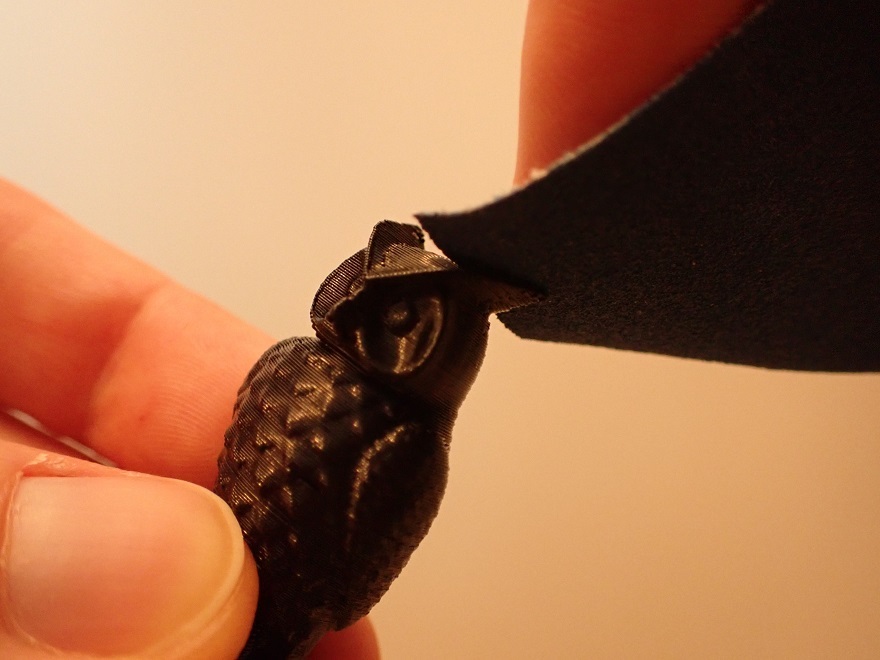
- Initial Sanding: Begin with a coarser grit sandpaper (e.g., 120-220 grit) to remove layer lines and any rough spots. Sand in a consistent direction, and if possible, in a circular motion. Periodically clean the sandpaper to remove filament debris.
- Wet Sanding: For a smoother finish, transition to finer grit sandpaper (e.g., 320, 400, 600 grit). Wet sanding, where you use water or a sanding lubricant with the sandpaper, is highly recommended for PETG. This helps to keep the sandpaper clean, reduces friction and heat buildup, and results in a much smoother surface. You can also use a sanding sponge for easier handling of curved surfaces.
- Progressive Grit Progression: Continue to move to progressively finer grits (e.g., 800, 1000, 1500, 2000 grit) until you achieve the desired level of smoothness. Between each grit, wash the print to remove any dust or residue.
- Polishing: After reaching your final sanding grit, you can further enhance the finish by using a plastic polish or a rubbing compound. Apply a small amount to a soft cloth and rub it onto the surface of the print.
- Heat Smoothing (Cautionary): While not as common or straightforward as with ABS, a very brief and controlled application of a heat gun on a low setting can sometimes further smooth minor imperfections on PETG. This requires extreme caution to avoid melting or deforming the print. It’s generally recommended to master sanding techniques before attempting this.
It is important to note that PETG, due to its semi-crystalline nature, may not achieve the mirror-like finish that some other plastics can attain with chemical smoothing. However, careful sanding and polishing can yield very impressive results.
Painting and Gluing PETG Parts
Painting and gluing are essential for assembling multi-part prints or adding aesthetic details. Material compatibility is key to ensuring these processes are successful.Here’s a guide to painting and gluing PETG:
- Painting: PETG can be painted, but it’s advisable to prime the surface first to ensure good adhesion. Acrylic-based spray paints and primers generally work well. Before painting, ensure the print is clean and free of oils or dust. Lightly sanding the surface with a fine-grit sandpaper (e.g., 400-600 grit) before priming can also improve paint adhesion. Avoid using solvent-based paints that can degrade or soften PETG.
- Gluing: For bonding PETG parts, cyanoacrylate (super glue) is a common and effective choice, especially for small areas. For larger or structural bonds, epoxy resins or specialized plastic adhesives designed for PETG or similar plastics are recommended. Always test your adhesive on a scrap piece of PETG first to ensure compatibility and strength. Some adhesives may require a primer or surface treatment for optimal bonding.
- Material Compatibility: When selecting paints and adhesives, always check the manufacturer’s specifications to confirm compatibility with PETG. Materials that contain strong solvents like acetone or certain aggressive alcohols can damage PETG. For example, while acetone is used to smooth ABS, it will likely degrade PETG.
Proper preparation, including cleaning and light abrasion of surfaces, will significantly improve the bonding and painting results for your PETG prints.
Applications and Use Cases for PETG Prints
PETG filament stands out as a versatile material in the 3D printing world, bridging the gap between the ease of printing PLA and the strength of ABS. Its unique combination of durability, flexibility, and chemical resistance makes it an excellent choice for a wide array of applications, from everyday household items to demanding industrial components. This section explores the diverse scenarios where PETG truly shines.The inherent properties of PETG, such as its high impact resistance, good temperature resistance, and low shrinkage, allow for the creation of prints that are not only aesthetically pleasing but also highly functional and long-lasting.
This makes it a preferred material for projects that require reliability and resilience.
Functional Parts and Tools
PETG’s excellent mechanical properties make it ideal for creating functional parts that can withstand stress and wear. Its impact resistance means that printed objects are less likely to shatter or break under load compared to other common filaments. This is particularly beneficial for parts that will be subjected to repeated use or mechanical stress.Common applications include:
- Brackets and Mounts: PETG can be used to create custom brackets for mounting components, shelves, or even electronics, offering a strong and reliable hold.
- Gears and Mechanical Components: For less demanding gear applications or prototypes of mechanical assemblies, PETG can provide sufficient strength and durability.
- Tool Handles and Grips: The slight flexibility of PETG allows for comfortable and ergonomic tool handles or grips that absorb some shock.
- Enclosures for Electronics: Its durability and moderate heat resistance make it suitable for housing electronic components, protecting them from physical damage.
- Jigs and Fixtures: For workshops and crafting, PETG can be used to print custom jigs and fixtures that improve precision and efficiency in various tasks.
When printing functional parts, it’s often beneficial to orient the print for maximum strength along the intended stress lines, taking advantage of PETG’s layer adhesion.
Outdoor Items and Durability
PETG exhibits good resistance to UV radiation and moisture, making it a superior choice for items intended for outdoor use or environments where humidity is a concern. Unlike PLA, which can degrade significantly when exposed to sunlight and moisture, PETG maintains its structural integrity for longer periods.Examples of outdoor applications include:
- Garden Planters and Tags: PETG prints can withstand outdoor weather conditions, making them suitable for plant pots, labels, and other garden accessories.
- Outdoor Signage: For temporary or semi-permanent outdoor signs, PETG offers a durable and weather-resistant solution.
- Housings for Outdoor Electronics: Protective enclosures for sensors, cameras, or other electronic devices exposed to the elements can be reliably printed with PETG.
- Automotive Components: While not for high-temperature engine parts, PETG can be used for interior automotive accessories, trim pieces, or even replacement clips that need to withstand varying cabin temperatures and UV exposure.
It is important to note that while PETG has good UV resistance, prolonged direct sunlight exposure over many years can still lead to some degradation.
Food-Safe Properties and Certifications
PETG is often touted for its food-safe properties, which opens up a significant range of applications, particularly in the kitchen and for items that come into contact with food. However, it’s crucial to understand what “food-safe” means in the context of 3D printing.A filament is considered food-safe if the raw material composition meets regulatory standards (like FDA or EU regulations).
However, the 3D printing process itself can introduce complexities:
- Layer Lines: The microscopic gaps between layers in a 3D print can harbor bacteria, making it difficult to clean thoroughly.
- Printing Environment: The printer and the environment it’s in must be clean to avoid contamination during printing.
- Post-Processing: Sealing or coating the print can create a smoother, non-porous surface, enhancing its food safety.
Therefore, while the PETG material itself might be food-grade, the printed object’s safety depends heavily on the printing process and any subsequent treatments.When selecting PETG for food-related applications, look for filaments that explicitly state they are FDA-compliant or meet relevant food contact regulations. Common certifications to consider include:
- FDA (Food and Drug Administration) Compliance: For the United States, materials should meet FDA guidelines for food contact substances.
- EU Food Contact Regulations: For Europe, compliance with Regulation (EC) No 1935/2004 and its specific measures is important.
Some ideal food-related applications include:
- Cookie Cutters: Easy to clean and create custom shapes.
- Kitchen Utensil Handles: For tools that don’t directly touch hot food.
- Food Storage Containers (with caution): For dry goods, and ideally with a food-safe coating or sealant.
- Specialty Molds: For non-hot food items like chocolates or candies.
It is always recommended to thoroughly wash and sanitize PETG prints before use, and consider sealing them with a food-safe epoxy resin for maximum safety and ease of cleaning.
Common PETG Print Projects and Suitability
To further illustrate the versatility of PETG, here is a list of common projects and an assessment of their suitability, along with general printing parameter recommendations.
| Project Idea | Suitability with PETG | General Print Settings Notes |
|---|---|---|
| Smartphone Stand | Excellent. Offers durability and a good aesthetic for a desktop accessory. | Standard settings, layer height 0.2mm, print speed 40-60 mm/s. |
| Cable Management Clips | Very Good. The slight flexibility prevents snapping, and durability ensures longevity. | Can benefit from slightly higher retraction to prevent stringing, otherwise standard. |
| Replacement Parts (e.g., appliance knobs, drawer pulls) | Excellent. PETG’s strength and temperature resistance make it suitable for many functional replacements. | Ensure orientation for strength. Consider higher infill density (25-50%) for critical parts. |
| Protective Cases for Gadgets | Very Good. Provides good impact absorption and a smooth finish. | Consider adding chamfers or fillets for added strength and a more professional look. |
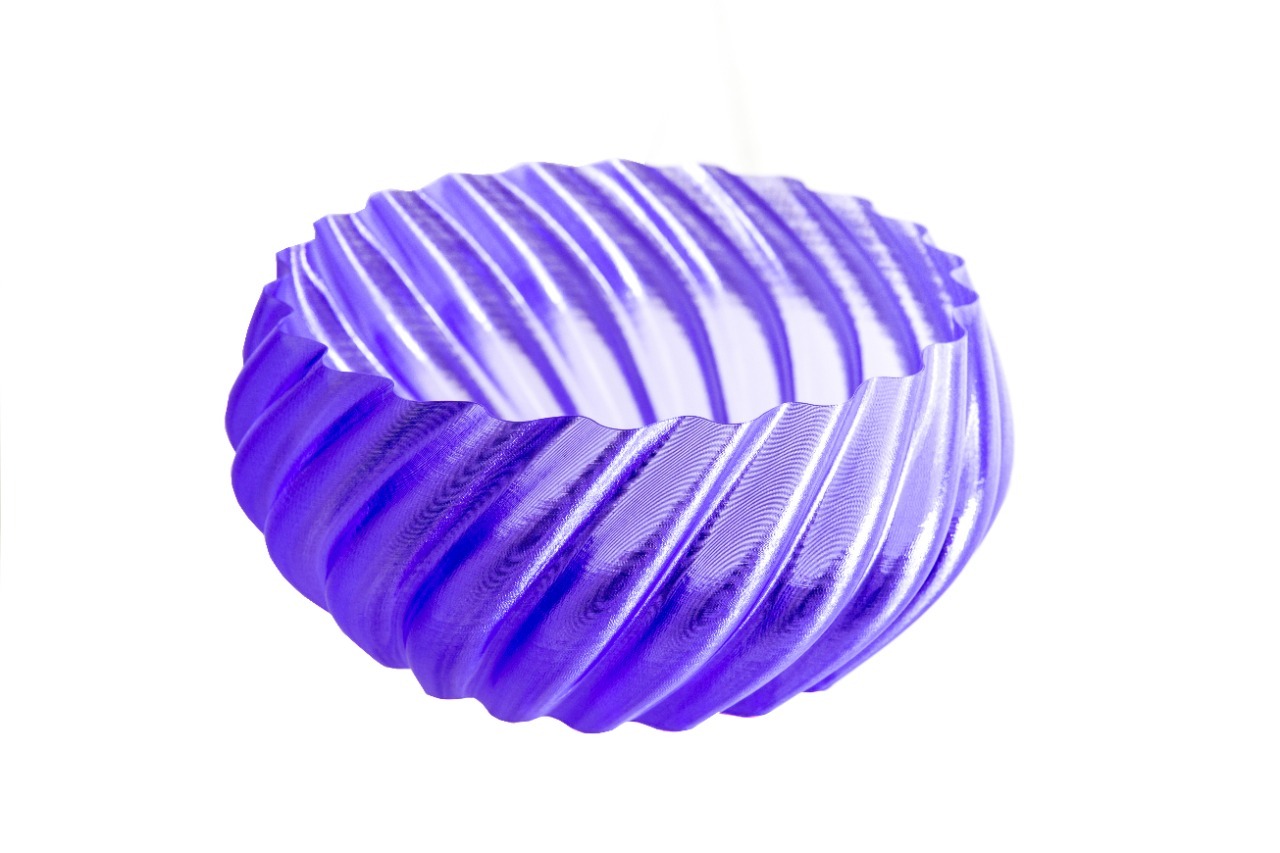
| Vases and Decorative Containers | Good. While not as rigid as some other materials, PETG can produce visually appealing results, especially with specific designs. Waterproofing may be necessary for true watertight vases. | Slower print speeds and careful temperature control can improve surface finish. Consider printing with 100% infill for water retention, or use a sealant. |
| Educational Models (e.g., anatomical, mechanical) | Excellent. Durability and ease of post-processing (sanding, painting) make it ideal for educational aids. | Standard settings. Can be scaled and printed with fine details. |
Final Wrap-Up
As we conclude our exploration of PETG filament, it’s clear that this material offers a compelling blend of strength, flexibility, and ease of use, making it an excellent choice for a wide range of projects. By understanding its characteristics, preparing your setup correctly, and applying the optimal printing parameters, you are well-equipped to overcome common hurdles and achieve impressive results.
Embrace the potential of PETG and elevate your 3D printing endeavors.